Fundamentals
Oracle Integration Cloud (OIC) has long been recognized as a leading platform for connecting applications, data, and business processes.
But its evolution over the past year reveals something much bigger: OIC is no longer just about integration , it’s becoming a comprehensive business automation platform.
At the heart of this transformation is the introduction of Robotic Process Automation (RPA) , not as a standalone product, but as an integral part of Oracle’s broader automation vision.
There’s a lot of marketing noise around RPA today , often portraying it as “the solution for everything”.
But Oracle takes a more pragmatic view.
Instead of trying to make RPA the centerpiece of automation, Oracle is making it a strategic tool in a larger toolkit , one that includes:
- Application integration using APIs
- Process automation for orchestrating human and system tasks
- B2B automation for managing partner interactions
- AI and decision services for dynamic business logic
- And now, RPA to interact with systems that don’t offer APIs
Oracle’s RPA is designed to interact with desktop applications just like a human would.
Think of it as a digital assistant that can:
- Open an application
- Log in
- Navigate menus
- Input or extract data
This is especially useful when:
- APIs don’t exist
- Legacy systems are involved
- It’s too costly or time-consuming to build traditional integrations
It’s not meant to replace APIs or traditional integrations , it’s there to fill the gaps when those options aren’t available or practical.
Unlike other RPA platforms that operate in silos, Oracle embeds RPA directly into the OIC Projects framework.
This means:
- RPA flows are managed alongside integrations, decisions, and events
- Everything is versioned, monitored, and governed from a single place
- You can combine RPA with APIs, decisions, and process flows to create seamless end-to-end automation
This unified experience simplifies lifecycle management and enhances collaboration between business and technical teams.
With the upcoming release, Oracle will integrate RPA into its accelerator framework.
This allows teams to:
- Leverage pre-built automation projects ( invoice processing ,for example)
- Customize and extend these flows with their own RPA logic
- Rapidly deploy solutions without starting from scratch
These accelerators are designed to be modular, reusable, and extensible , reducing time to value significantly.
Oracle is already building out capabilities that bring AI agents into the mix intelligent, goal-driven components that will complement RPA, process flows, and decision logic.
Building robots to automate repetitive desktop tasks has never been easier and it’s fully integrated into your Projects workspace.
Let’s walk through a real-world scenario: retrieving a Purchase Order (PO) amount from a desktop application using an RPA robot.
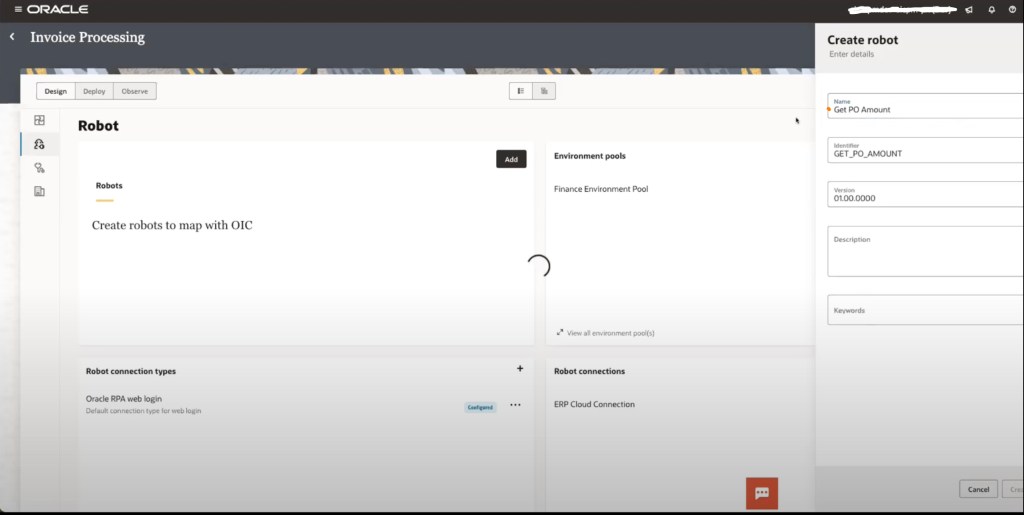
Step 1: Create and Configure Your Robot
Start by navigating to the Robots section within your OIC project.

Here, you can manage:
- Environment Pools – Define where and how robots will run
- Robot Connections – Set up connection endpoints and security, just like integration connections
For this example, we’ll create a new robot and name it GetPOAmount.
Step 2: Define the Robot’s Interface
Next, we define the robot’s input and output parameters. In this case:
- Input:
poNumber(the purchase order number) - Output:
poAmount(the amount retrieved from the system)

This interface allows the robot to behave like a callable component
Step 3: Train the Robot to Navigate a Browser
Since this robot will interact with a browser-based desktop application, we need to train it step-by-step:
- Set the starting page
Rather than hardcoding a URL, we use a drag-and-drop ERP Cloud connection to dynamically inject the URL. This design allows seamless movement of the robot between test and production environments , no code changes required.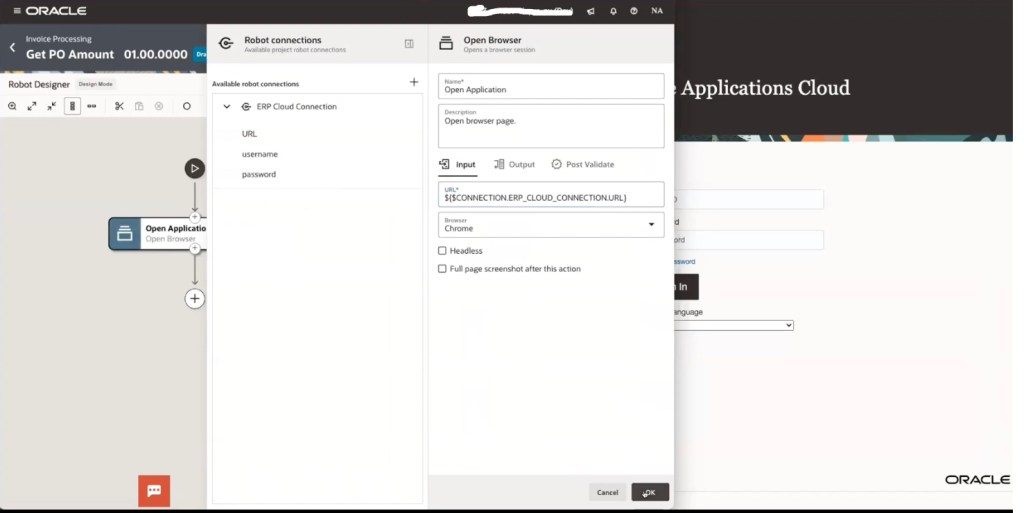
- Login and Navigate
Once the robot reaches the login page, it will:- Enter credentials (securely pulled from the connection)
- Click through the navigation menu
- Search for the specified PO
- Extract the PO amount from the page

This interaction mimics exactly how a human would perform the task, and is recorded and visualized using OIC’s low-code robot builder.
Once your bot is recorded and trained (in this case, to fetch a PO amount from a desktop app), OIC offers a low-code interface to further enrich it.
Add Custom Activities Like Logging
Within the RPA canvas, you can:
- Add logging to output or track values

- Configure pre- and post-validation checks

- Access and edit recorded targets (like buttons or fields)

For example, if a UI element like the Search button is used multiple times, it’s centralized in a global target library. This means you can update its location in one place, and all instances will be updated.
Environment Pools: Where the Bot Runs
After configuring the bot logic, you assign it to an Environment Pool , which acts like a compute layer for RPA execution.
- In testing, you might assign it to a local desktop.
- In production, you can configure multiple environments (bots running in parallel on different machines or virtual desktops).
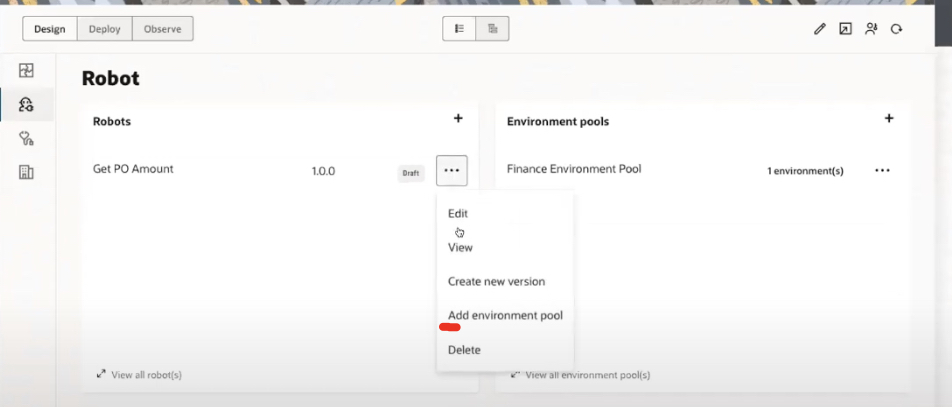
Once your robot is ready and assigned, it can be activated and invoked just like any other service in OIC.
Embedding the RPA Bot into an Integration Flow
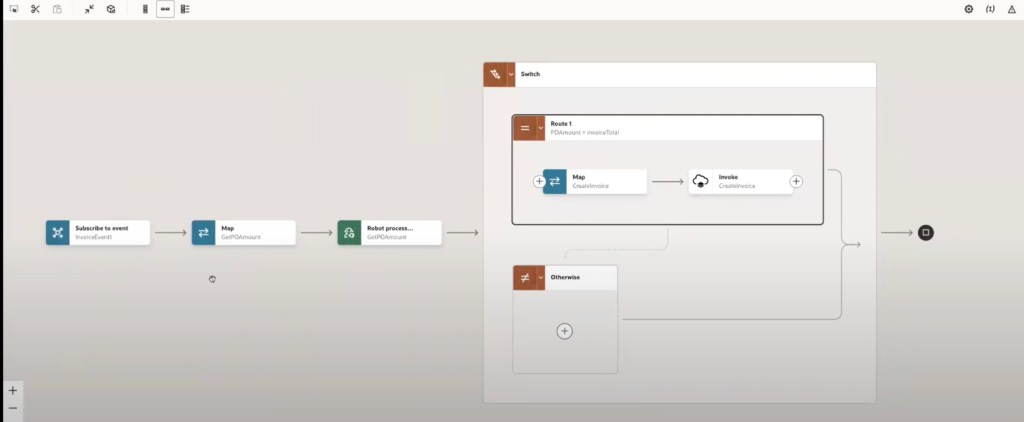
Now, let’s connect the RPA bot to a real business scenario: »Validating invoice amounts » against the values in a purchase order retrieved from a legacy desktop app. Here’s step-by-step details:
- Open the integration flow (e.g.,
Create Invoice) - Insert a new version of the flow to include the bot
- Use the Robot Activity to drag-and-drop the previously created RPA bot
- Map Inputs and Outputs:
- Input:
PO Number(from incoming event) - Output:
PO Amount(from bot execution)
- Input:
- Insert a Switch Statement:
- Compare
PO Amountfrom the bot withInvoice Amountfrom the event - If they match: Proceed to create the invoice
- If not: Trigger an alternate process flow (e.g., escalate for review)
- Compare
- Use the new copy/paste feature to organize steps within conditional logic easily
Deployment Profile capability.
A Deployment Profile allows to group together multiple artifacts such as integrations, robots, and events —into a single, versioned release package.
Instead of activating each component manually, you can now define a deployment profile , select all related components, and deploy them together in one seamless action.
Once defined, activating the profile will simultaneously deploy and activate all components.
How It Works ?
- Create a Deployment Profile
- Select Components you want included (integrations, robots, connections)
- Save and Deploy , OIC takes care of activation in the correct order
- Test and Validate using your sample payload
Other Great Use Cases for Oracle RPA
Oracle RPA complements your automation strategy by filling critical UI gaps. Some practical examples include:
1. Legacy ERP Systems
Automate repetitive tasks like:
- Invoice entry
- PO validation
- Customer account creation
2. Vendor or Government Portals
When you need to upload/download data or reports from systems that don’t offer integration endpoints.
3. Human-in-the-Loop Automation
Automate desktop workflows that support human users, such as:
- Pre-filling forms based on internal data
- Extracting data from scanned documents
4. Application Bridging
When migrating between two systems (e.g., from on-prem to SaaS), use RPA to « bridge » them for a period — syncing data UI-to-UI as a transitional automation layer.
Thanks for reading !

 Sanae BEKKAR - My Blog -
Répondre à Oracle Integration Release 25.2 – Sanae BEKKAR – My Blog – Annuler la réponse.