Today’s post , we explore the third use case for the generative AI in the management narrative reporting : Causality for exception .

To begin, edit the Grid section. In it, you’ll find 4 entities/main divisions and for Q4 , a conditional text is applied , mentioned by the small triangle.

Once you’re there, click on ‘Causality for exceptions’ on the conditional properties tab.
Let’s take a look at the condition : « The current cell value is great than 120M , and the cell that will meet this condition will be highlighted with red color » .

In this scenario, we use AutoTextSummary(ZOOM) , as ZOOM is specific to the causality for exceptions use case.

Now let’s run the report :

You see that the entities (regions) have met the criteria of the condition highlighted in red (>12M).
Below , a description is generated by GenAI service that has zoomed into that entity « North America » and found the greatest contributors for it (USA, Canada, Mexico) and return this narrative text.
[North America’s Electronics segment reported net revenue of 136081111 in Q4 2022.
The top contributing entities were the USA with 126.907.104, Canada with 6.116.005 and Mexico with 3.058.002]
The narrative text content is formatted in alignment with the style of existing default examples defined in the « CausalityAnalysisPromptTemplate.properties » file , like shown below:
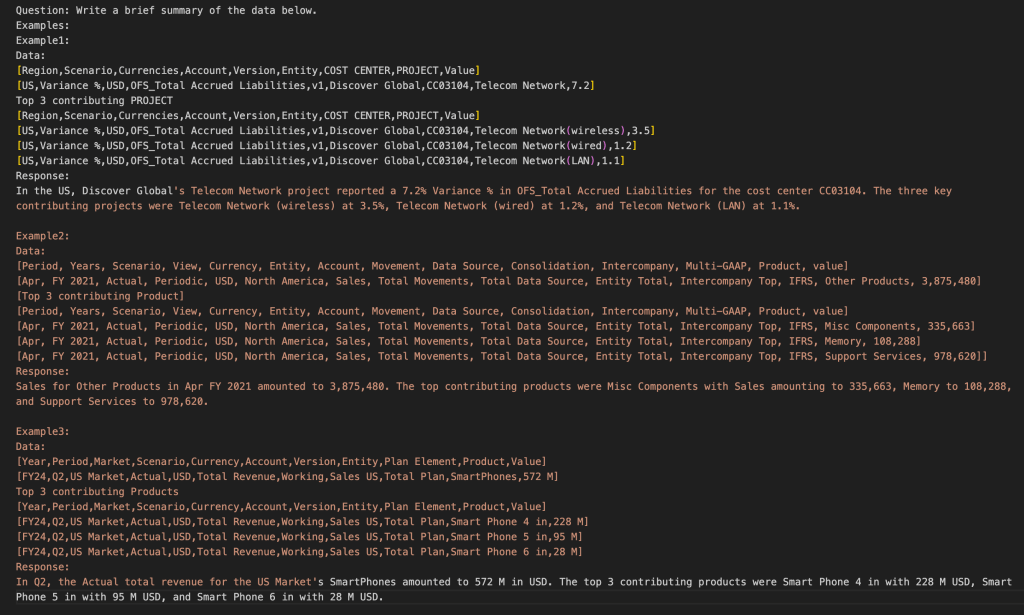

Normally, those provided examples are sufficient. However, you can still include examples that more accurately reflect the actual dimension and member names, based on the hierarchies the customer is using.
Customizing the examples of this prompt.properties file should be done just in this case :
- Styling the generated response if not what customer expect.
- Not cover the metadatas that should be included.
. Important to notice .
Oracle typically includes 5–6 examples per use case.
So avoid exceeding this, as LLMs are subject to token limits — a restriction on the total number of words and characters processed.
Now, let’s break the structure of one examples down a little further with some considerations to know:

- The number of the dimensions in the first row should match the number of members in the second row.
[Region,Scenario,Currencies,Account,Version,Entity,COST CENTER,PROJECT,Value]
[US,Variance %,USD,OFS_Total Accrued Liabilities,v1,Discover Global,CC03104,Telecom Network,7.2]
- Do not change « Value » at the end of the first row with 7.2 — « Value » is not a dimension name with 7.2 as its member, but rather a standard keyword referring to a data cell.
- The analytic dimension only applies to this use case ‘causality for exceptions’.
This concludes our review of the three supported use cases and the GenAI service technologies, as demonstrated through their sample reports.
![Avatar de [GenAI & Narrative Reporting , Oracle EPM Cloud] Use case .2. Comparative analysis – Sanae BEKKAR – My Blog –](https://sanaebekkar.com/wp-content/uploads/2023/05/cropped-pexels-photo-265216-1.jpeg?w=40)
 Sanae BEKKAR - My Blog -
Répondre à [GenAI & Narrative Reporting , Oracle EPM Cloud] Use case .2. Comparative analysis – Sanae BEKKAR – My Blog – Annuler la réponse.