Today’s post covers three key components in Oracle Integration: the File Adapter, FTP Adapter, and how to set up dynamic FTP connections.
We’ll start by taking a closer look at the FTP Adapter , what it does and how to use it.
What is the FTP Adapter in Oracle Integration Cloud?
The FTP Adapter in Oracle Integration Cloud (OIC) provides a simple and secure way to connect to FTP or SFTP servers for reading and writing files as part of your integration flows.
The FTP Adapter enables seamless file-based integration across both cloud and on-premises or privately via a Connectivity Agent.
It supported only as an invoke role connection.
It can encrypt and decrypt files using PGP cryptography and perform a signature verification on the file.
It can unzip an archive file for you automatically if required .
It’s support the following security policies :
- FTP Server Access Policy ,
- FTP Public Key Authentication
- FTP Multi Level Authentication.

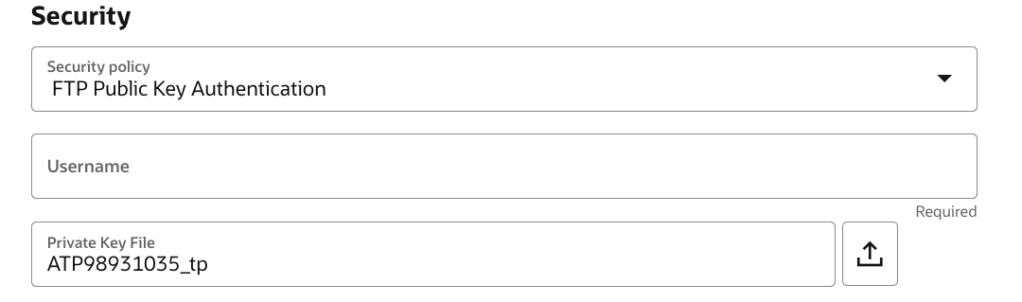
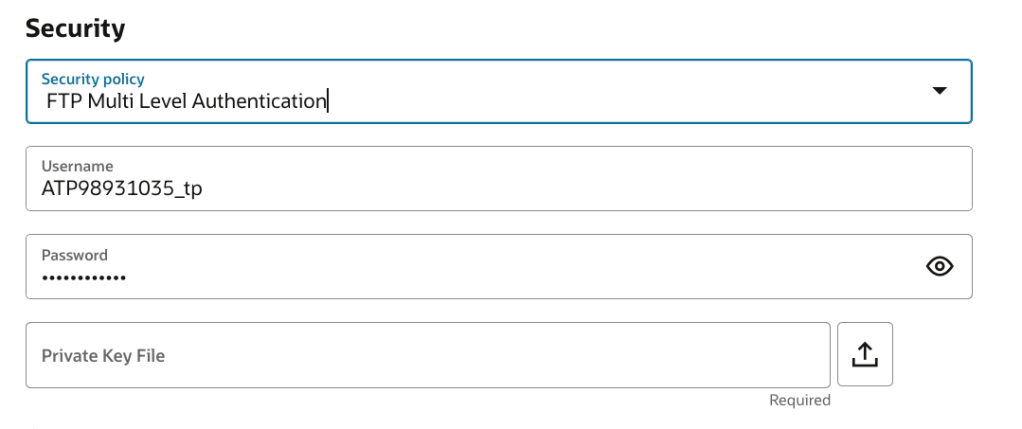
Here are the supported operations : Read , List , Move , Write , Delete , Download .
Finally it can be used to access the OIC embedded File Server.
Some supported FTP Adapter Integration Patterns
- Scheduled File Retrieval
One of the most commonly used patterns with the FTP Adapter in Oracle Integration Cloud (OIC) is the scheduled file retrieval.
In this approach, you create a scheduled integration that leverages a pre-configured FTP Adapter connection.
This connection can point to either an external FTP/SFTP server or the embedded file server provided by Oracle.
With each scheduled run, the integration is automatically triggered, and the FTP Adapter is invoked to retrieve one or more files.
These files can then be passed along for transformation, validation, or integration with downstream systems.
This pattern is ideal for batch processing, daily imports, or any scenario where files need to be periodically pulled from a remote location for further processing within your enterprise systems.
2. Writing and sending files
For outbound file delivery, a common pattern in Oracle Integration Cloud (OIC) is to use the FTP Adapter to write files to an external FTP/SFTP server or to the embedded file server available within OIC.
This is typically used to send reports, data exports, or transformed content to downstream systems.
Now we move to check more details about the file adapter
What is the File Adapter in Oracle Integration Cloud?
The File Adapter in Oracle Integration Cloud (OIC) enables integrations to read from or write to files located on a local or shared file system that is accessible through the Oracle Connectivity Agent.
It is primarily used for on-premises file integration scenarios, where files are exchanged within internal networks or with legacy systems.
The adapter supports both inbound (trigger) and outbound (invoke) operations and can handle various file formats (as CSV, XML..), making it ideal for batch processing, data imports/exports, and hybrid integration use cases.
It does not have the capability to unzip an archive.
Supports both Trigger and Invoke role connections.
Cannot decrypt PGP encrypted files .
Supported file operations are : Read , List , Move , Write , Delete , download , Polling new files .
No support for the OIC embedded File server.
Some supported File Adapter integration patterns :
. Event-Driven File Pickup
Another widely used pattern in Oracle Integration Cloud (OIC) involves using the File Adapter as a trigger to process files from an on-premises or shared file system.
In this pattern, a File Adapter-triggered integration is configured using a Connectivity Agent.
The agent monitors a specified shared directory that is accessible to the machine where the agent is installed.
Whenever a new file is placed in the monitored location, the File Adapter detects it and automatically kicks off the integration flow.
The file is then picked up and passed into OIC for transformation or routing to target systems.
This setup is ideal for event-driven integrations, especially in hybrid environments where files are generated or dropped by legacy systems on internal networks.
. SaaS use cases :
These adapters are traditionally used to read or write files from local directories, shared file systems, or FTP/SFTP endpoints. But their use extends far beyond that.
– Sending Files via API (Use Case: HR Automation)
In addition to writing files to storage systems, OIC can interact with applications that accept file attachments as part of API requests.
As example, Oracle Taleo Enterprise Cloud, which can receive documents like resumes or candidate photos as file attachments.
This is especially useful in HR automation scenarios, supporting processes like onboarding, recruitment, and compliance, where documents need to be uploaded dynamically during an integration flow.
– Receiving Files via API (Use Case: SaaS Data Extraction)
On the other end, some Oracle SaaS applications, such as Oracle Commerce Cloud and Oracle Logistics Cloud, can return file attachments in their API responses.
When invoked by an integration, these systems might send back reports, shipping labels, or export files.
OIC can capture these files and process them further , just like it would with files from an FTP server or an on-premises directory.
This is ideal for automating business flows where data must be:
- Extracted from SaaS applications
- Stored in cloud storage or databases
- Forwarded to ERP systems or email notifications
When to Use the FTP Adapter Instead of the File Server Action?
While the File Server action in Oracle Integration Cloud offers similar functionality to the FTP Adapter, there are specific scenarios where the FTP Adapter is the preferred choice:
- In-memory processing: If your use case requires a file to be brought directly into the integration’s virtual file system-VFS and processed in memory, the FTP Adapter is better suited for this.
- Security operations: When you need to encrypt or decrypt files, or sign and verify signed files, the FTP Adapter provides built-in capabilities to handle these security related tasks features not supported by the File Server action.
What about the new FTP Adapter Dynamic connection ?
Oracle Integration Cloud’s FTP Adapter now supports a powerful feature: dynamic connections.
This capability is especially useful in scenarios like global retail operations, where a central inventory management system must send daily stock or pricing updates to the FTP servers of regional distribution centers or franchise stores.
As new locations come online or existing ones change their infrastructure, integration developers would traditionally have to update and redeploy the integration each time.
With dynamic FTP connections, the system can simply pass the appropriate connection ID at runtime, automatically routing files to the correct endpoint without modifying the integration flow , ensuring scalability and rapid rollout across the retail network.
Traditionally, developers would need to modify the integration each time a new FTP location was added.
With dynamic FTP connections, this is no longer necessary, you can pass the connection ID at runtime, allowing files to be routed to the appropriate FTP server without altering the existing integration.
These dynamic connections can be local, shared across projects, or standalone.
You can also monitor which connection was used via the Activity Stream.
From a design perspective, enabling dynamic connections is simple: just check the “Enable Dynamic Connection” box and use an expression (e.g., via a lookup) to set the FTP connection ID at runtime.

This significantly reduces development overhead and enhances flexibility, particularly in fast-changing enterprise environments.
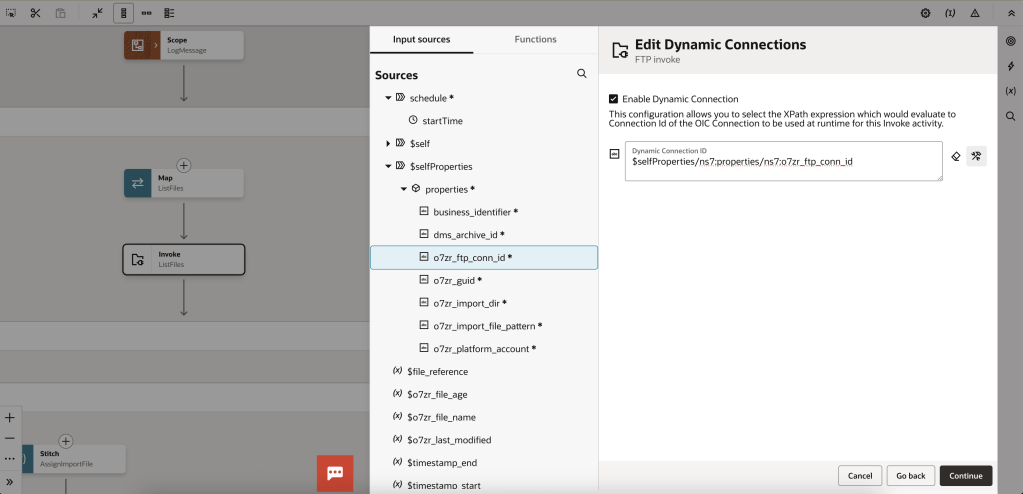
More details: https://docs.oracle.com/en/cloud/paas/application-integration/ftp-adapter/invoke-dynamic-connectons-page.html
Oracle Integration Cloud offers powerful and flexible tools for file-based integration through the File Adapter and FTP Adapter.
The addition of Dynamic FTP Connections further enhances this flexibility by allowing connection details to be supplied at runtime, eliminating the need to modify and redeploy integrations when endpoints change.
This is especially valuable in dynamic environments such as healthcare, retail, or logistics, where scalability and adaptability are key.
By combining these features, developers can build more modular, reusable, and scalable integration flows that are easier to maintain and extend.

 Sanae BEKKAR - My Blog -
Laisser un commentaire