This post is the continuity of this previous post where we are exploring the capabilities of the Gen AI for the Narrative Reporting in Oracle EPM Cloud suite .
Let’s explore a new report for the new use case : Comparative Analysis Sample Report 13b (GenAI-Comparative Analysis).

Let’s edit the report that we can see how these were set up.
Like you see, the report template combine :
- A grid on top ,
- Conditional text() text function , down below.
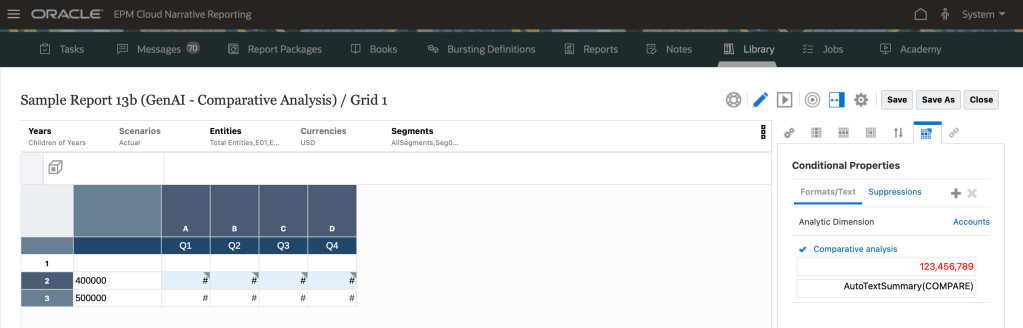
For this use case, a comparaison and description of that comparaison will be done for the datas that meed the condition from quarter to quarter.
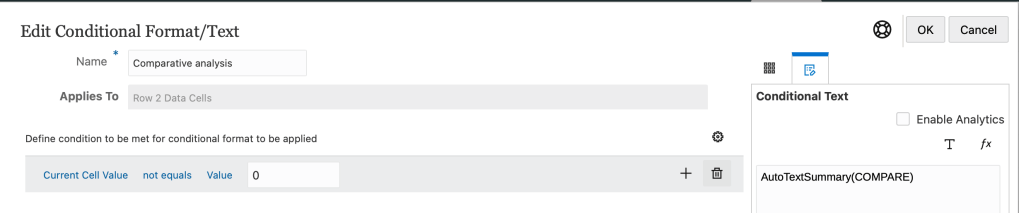
The condition is set up like this : if the Current Cell Value is not equal to 0.

Then the conditional AutoTextSummary() use COMPARE , as a compare parameter that is used for the Comparative analysis.
Now, Let’s run the report :

You see that the Gross Profit meet the condition (not equal to 0) , and it’s highlighted in red.
And you have a description generated by the prompt with some point of view :
- Gross Profit for Total Entities across all Segments in Q1 2022 was 137,948,208.
Gross Profit for Total Entities across all Segments in Quarter 2, 2022 was 152,418,267, which reflected an
increase of 14,470,059 or 10.49% over Quarter 1, 2022.
Gross Profit for Total Entities across all Segments in Quarter 3, 2022 was 155,266,679, which represents an
increase of 2,848,412 or 1.87% over Quarter 2, 2022.
Gross Profit for Total Entities across all Segments in Quarter 4, 2022 was 147,520,795, which is a decrease of –
7,745,884 or -4.99% compared to Quarter 3, 2022.
The following section offers an in-depth analysis of prompt engineering elements in GenAI that impact the variation in LLM responses.
| Element | Belongs to GenAI Layer | Purpose |
|---|
| 1. Preamble | System / Prompt Engineering | Define global behavior / role |
| 2. Examples | Few-shot Prompting | Teach by example |
| 3. Instructions | Prompt Engineering | Set boundaries and expected output |
| 4. Questions | Input Layer / Interaction | The user’s actual query |
1. Preambule : It’s an initial guideline message that basically can refine the model’s default interaction logic and enables you to tailor the response style and behavior to your needs.
Example:
Tailored for a report analyst persona with executive-style version :
Software Applications – Sales Overview (June FY2024)
Total revenue: $1,365,287
Breakdown by product:
- PPM: $1,000,607 (73.3%), PPM remains the dominant revenue source, with over 70% share.
- Procurement: $226,102 (16.6%), Procurement shows moderate contribution; potential for targeted growth.
- ERP: $1,360 (0.1%), performance remains negligible, ERP may require strategic review.
2. Examples
Called shots in GenAI terminologie.It’s up to you , to give 1-shot or few-shots , that is single or multiple examples and you provide the response in the examples, that the LLM then answer your question with your defined style and a way of the given examples.
3. Instructions are very specific commands that you provide to not let LLM hallucinate and let it execute certain tasks in a certain way.
4. Question to be answered : is the actual question that you’re asking , the prompt.
. Important to notice .
For all three use cases explored in Management Narrative Reporting, Oracle does not permit customers to make changes on the Preamble , Instructions and Questions.
Just the examples (shots) can be customized to better align with specific needs, as the default response may not be sufficient.
When you customize, providing just 2–3 examples allows LLMs to accurately identify and generalize the intended pattern.
That wraps up this post! Stay tuned — the next article will cover the last use case « Causality for exceptions ».
 Sanae BEKKAR - My Blog -
Laisser un commentaire