Within AI-Driven Finance, GenAI and reporting bring the decision making capability and more intelligence within your reporting and analysis in finance groups.
And today’s post focus on the Generative AI aspect of reports in Oracle EPM Cloud Suite , all the features , the HL Design Architecture and the framework around it.
Gen AI is available in Narrative |Reporting reports in the enterprise edition only, from the release 24.10.
It’s exposed as embedded in the Oracle EPM platform , included in Planning, Financial consolidation and close, Freeform, etc.
Gen AI within reports, how is working ?
- High-Level architecture :

- The Report user run the report in Narrative Reporting
- Narrative Reporting retrieves the data from Cloud EPM data sources or Fusion or Essbase Cloud.
- The conditional formatted data and the customized prompt are returned to the Fusion AI service , which is on a separate instance , note that Gen AI use Fusion AI service, on a separate instance in each data center.
- Fusion AI service generate a response back to Narrative Reporting.
- Then the Narrative Reporting combines the data just retrieved with GenAI and returns that to the report user.
- The required configurations
Gen AI and reports continues to use the conditional formatting framework to define conditions like the conditional text. It’s set up and enabled by the Report Designer and use the new conditional text function called « AutoTextSummary », used to plug into GenAI and generate the narrative output.
a. Enabling GenAI : Tools> Settings> Generative AI


b. Once successfully enabled, you see a new tools card for « Machine Learning Files »
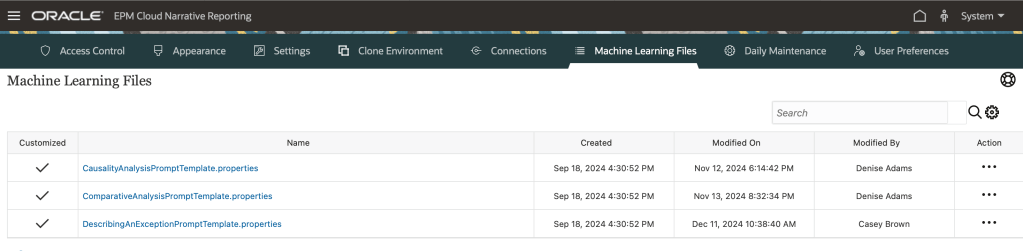
That contain 3 main machine properties files that correspond to the 3 use cases supported in Gen AI within Narrative Reporting today:
- Use case 1: Causality Analysis , mainly used where we want to examine one of the relevant cell dimensions were conditionally satisfied and describe the top 3 contributors to it.
- Use case 2: Comparative Analysis– mainly used if I have columns in the grid and the period dimension with time in ascending order, we describe the cell value in comparaison to the prior period.
- Use case 3: Describing An Exception/anomaly – mainly used to describe the cell where a condition is satisfied through conditional text. For example, a grid cell which satisfies a variance threshold.
A deep dive for each use case by detailled examples will be covered in the upcoming posts.
Finally, here some recommendations :
- User cannot interact directly with GenAI , not like chatbot for example.
- For any fine tuning or formatting of GenAI responses , it’s done via a system level through the prompt template files.
- GenAI should be treated a decision support tool ONLY , means that always the user MUST review AI-generated content and verify its accuracy before using or relying on it to inform decisions.
You can get a list of last updates in : Cloud EPM What’s New Guide for October.
 Sanae BEKKAR - My Blog -
Laisser un commentaire