During the last article ‘All about the connectivity agent‘ , I listed different OCI gateways and components for each deployment patterns.
Let’s go deep dive on the following schema and define briefly each component listed here and how it uses:
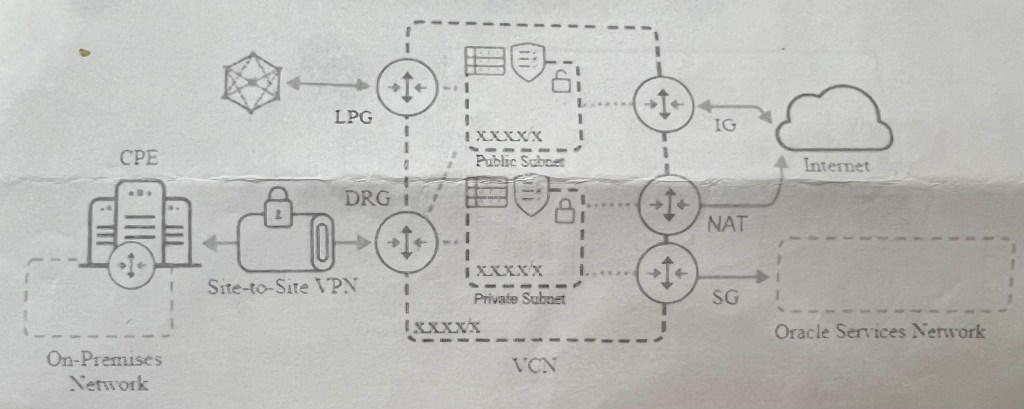
DRG -Private/Public subnet -CPE -Service Gateway -NAT -Internet Gateway -LPG
Let’s get started !
Public subnet
Allow your resources to communicate to the open internet, make them available from the public internet and provide them with a public address IP.
Private subnet
Resources can communicate with open internet but not the other direction and cannot have a public IP address.
Oracle Services Network
It’s an OCI resource. Like AWD , it’s resource that has a public IP address and are available to any resource has a public IP.
Internet Gateway
If you want to reach public internet from a public subnet, you need to provide a public IP address to those resources.
NAT- Network Address Translation
Used if you want to reach public internet from a private subnet. (other way is not possible). However, it cannot be a used for a transit routing.VCN has a limit of one NAT gateway to be configured.
Service Gateway
If you want to allow your private network’s resources to communicate with Oracle resources remaining within OCI, bypassing internet.That allow the communication to Oracle Services Network without leaving OCI.
DRG-Dynamic Routing Gateway
Used if you want to communicate on-premises resources through FastConnect or VPN-Virtual Private Network and allow to communicate to other Cloud providers or to a remote VCN.
LPG- Local Peering Gateway
If you want that 2 VCNs communicate, that are located in same region.
CPE
Customer Premise Equipment , that is a virtual representation of your custom on-prem equipment.
Thanks for reading!
 Sanae BEKKAR - My Blog -
Laisser un commentaire