When working on a project, it is good to have a central system that controls and builds your software projects.
One well-known tool for this from Apache is Maven.
So in general, Maven is:
• An automated build system
• A project management system
• A library and dependency handling system
• A project description system
• A site generation system With Maven you can keep a set of standards, and maintain project lifecycling.
You can define phases in your lifecycle like for instance when you’d like to execute a particular build or plugin.
An important thing within Maven is the project object model. This is well known to Maven users.
If your project is using a well-defined project object model (POM), Maven can then apply cross-cutting logic from a set of shared or custom plugins.
The project object model (POM) One of the fundamentals in Maven is of course the POM.
It describes all kinds of important data of a project such as the project, its name/version, type, and dependencies.
It standardizes your configuration and standard directory layout for project, so you do not need to configure, and no path settings are required.
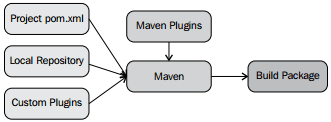
POM can automate building and packaging and it bundles all tests, resources, and classes. With the POM you will have well-defined project life cycling. In the following screenshot, you can see the Maven Build process:
WebLogic 12c provides additional functionality since the 11g release like:
• Installation of Weblogic ZIP distribution onto a machine where WebLogic has not been installed
• WebLogic domain creation
• Start/Stop WebLogic Servers
• Execute WLST Scripts You can use Maven installation to install the WLS maven plugin.
mvn package
One of the nice features is that you can manipulate your WebLogic domain by stopping, starting, deploying, undeploying, and redeploying.
With a simple Maven command, you can start the domain:
mvn wls:start-server
 Sanae BEKKAR - My Blog -
Laisser un commentaire