Archiver is a Java applet that is used to transfer and reorganize Content Server files and information. Archiver has four main functions:
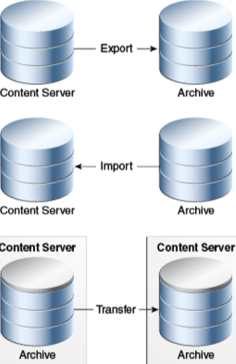
■ Export: Used to copy native and web-viewable files out of the Content Server instance for backup, storage, or import to another Content Server instance.
You can also export content types and user attributes.
You export to an archive, which contains the exported files and their metadata in the form of batch files.
■ Import: Used to retrieve files and Content Server information from an exported archive. Importing is typically used to get a copy of content from another Content Server instance or to restore data that has been in storage.
You can also change metadata values during an import.
■ Transfer: Used to transfer content from one Content Server instance to another instance over sockets.
This is typically used to move or copy content across a firewall or between two Content Server instances that do not have access to the same file system.
You can also use the Transfer function to transfer archive files between Content Server instances that have access to the same file system.
■ Replicate: Used to automate the export, import, and transfer functions.
For example, you can use replication to automatically export from one Content Server instance, transfer the archive to another computer, and import to another Content Server instance.
The following illustration demonstrates these basic functions.
Folder Archiving Application
Using Folder Archiving you can export and import the folder hierarchical structure directly from the Folders administration interface.
The entire folder hierarchy is exported to a text file in HDA format, which can then be read by the Content Server instance when it is imported.
This component supports Contribution Folders (provided by the Folders_g component), but does not support Folders (provided by the FrameworkFolders component).
Note: The ConfigMigrationUtility component supports Contribution Folders (provide by the Folders_g component), but does not support Folders (provided by the FrameworkFolders component).
Folder Structure Archive Application
Overview The Folder Structure Archive component can be used with the archiving aspect of the Folders component but its functionality differs in several ways:
■ It can export selected portions of the folder structure. The Folders Archive function can only export the entire folder structure.
■ It can create incremental archives. These are archives that contain only changed folders. The built-in Folder Archive function creates archives that contain all items.
■ It can include both the folder structure and folder content in the archives. The Folder Archive function can only export the folder structure and none of the content.
Functions This component can be used for three major purposes:
■ As a backup tool. With this component you can copy the folder structure, including its content.
■ As a duplication tool. This component can be used to copy the folder structure and content and create an exact copy on another computer, helping to simplify multi-server setups.
■ As a synchronization tool. With this component you can ensure that copies of your folders and their contents are kept synchronized across different systems.
Note: This component supports Contribution Folders (provided by the Folders_g component), but does not support Folders (provided by the FrameworkFolders component)
ArchiveReplicationExceptions Application
The ArchiverReplicationExceptions component is installed (enabled) by default with the Content Server instance.
It enables administrators to prevent failed imports from stopping replication.
It does this by capturing failed imports and putting them into an exceptions archive, then sending email to the administrator that a failed import has occurred.
For content items to be processed by the ArchiverReplicationExceptions component, the administrator must manually set configuration entries in the IntradocDir/config/config.cfg file.
The configuration variables customize the behavior of the importing Content Server instance to allow for certain situations and to distribute the error reporting based on the configured criteria.
 Sanae BEKKAR - My Blog -
Laisser un commentaire