When you configure an Oracle application for use with Single Sign-On (SSO) and have set up Oracle Access Manager (OAM) or Oracle Single Sign-On (OSSO), the WebCenter Content GET_ENVIRONMENT service provides the server name, server port, and relative webroot to the application service call (for example, the WebCenter Content Doclib service).
However, the values provided by GET_ENVIRONMENT might not be correct for your SSO configuration.
If you want to redirect the application service to use the OHS server host and server port (because both OAM and OSSO solutions require front-end applications with OHS), you must modify the Content Server host and server port configuration values.
You can use either of the following two methods to modify the Content Server host and server port values:
■ Use the Oracle WebLogic Server Administration Console.
■ Use the WebCenter Content standalone System Properties application.
1. Go to the WebCenter Content domain directory.
2. Change the directory to ucm/cs/bin
3. Run the standalone application: ./SystemProperties
4. In the System Properties window, select the Internet tab.
5. Update the HTTP Server address to the OHS (or Load Balancer) server host and server port values.
6. Exit the System Properties window.
7. Restart the Oracle WebLogic Server domain.
Configuring WebCenter Content and Single Sign-On for Windows Native Authentication
Setting up WebCenter Content and single sign-on (SSO) with Microsoft clients for Windows Native Authentication (WNA) requires configuring the Microsoft Active Directory, the client, and the Oracle WebLogic Server domain.
As part of configuring SSO with Microsoft clients, you must specify a LDAP authentication provider to access the external Microsoft Active Directory. Oracle WebLogic Server offers the Active Directory Authentication provider.
As part of configuring SSO with Microsoft clients, you must configure the Negotiate Identity Assertion provider in Oracle WebLogic Server security realm.
The identity assertion provider decodes Simple and Protected Negotiate (SPNEGO) tokens to obtain Kerberos tokens, validates the Kerberos tokens, and maps Kerberos tokens to WebLogic users.
Use the Oracle WebLogic Server Administration Console to add a new provider in the appropriate security realm in the domain structure, assign it a name, then select NegotiateIdentityAsserter for its Type.
Activate the changes and restart the Oracle WebLogic Server. Now your server can use the Kerberos ticket it receives from the browser.
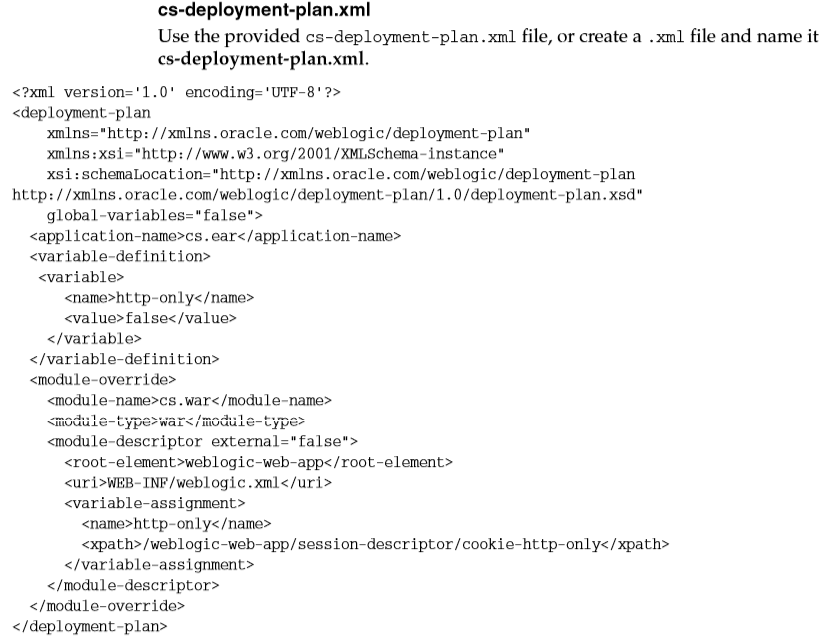
You must redeploy each WebCenter Content application (Content Server, Inbound Refinery, Records) that will be used in the Windows Native Authentication (Kerberos) environment, using an associated deployment plan.
A deployment plan is a XML document. Oracle provides a plan for each of the three WebCenter Content applications: cs-deployment-plan.xml, ibr-deployment-plan.xml, and urm-deployment-plan.xml.
You also can implement a deployment plan using the Oracle WebLogic Scripting Tool.
1. Log in to the Oracle WebLogic Server Administration Console.
2. Click Deployments in the Domain Structure navigation tree.
3. In the Control tab, click Next until you see the WebCenter Content deployment you want to change:
■ Oracle WebCenter Content Server
■ Oracle WebCenter Content: Inbound Refinery
■ Oracle WebCenter Content: Records
4. Select the check box to the left of the deployment to be changed.
5. Click Update.
6. Under the Deployment plan path, select Change Path.
7. Navigate to and select the appropriate plan file:
■ cs-deployment-plan.xml (for Content Server)
■ ibr-deployment-plan.xml (for Inbound Refinery)
■ urm-deployment-plan.xml (for Records)
8. Verify that Redeploy this application using the following deployment files is selected.
9. Click Next.
10. Click Finish.
11. To verify that SSO with Microsoft clients is configured properly, point a browser to the Microsoft Web application or Web service you want to use.
If you are logged in to a Windows domain and have Kerberos credentials acquired from the Active Directory server in the domain, you should be able to access the Web application or Web service without providing a user name or password.
 Sanae BEKKAR - My Blog -
Laisser un commentaire