In a production system, Oracle WebCenter Content applications need to use an external Lightweight Directory Application Protocol (LDAP) authentication provider rather than the Oracle WebLogic Server embedded LDAP server, which is part of the default configuration.
You need to reassociate the identity store for your application with one of the following external LDAP authentication providers before you complete the configuration of a Managed Server, before you connect a Managed Server to a repository, and before the first user logs in to the application:
*Oracle Internet Directory
*Oracle Virtual Directory
* Oracle Unified Directory
* Third-party LDAP server
For an Imaging application, the user who logs in first to an Imaging Managed Server is provisioned with full security throughout the server.
It is easier to reassociate the identity store for Imaging with an external LDAP authentication provider before the first user logs in, completes the configuration of the Imaging Managed Server, and connects it to the Oracle WebCenter Content repository.
For a production installation, Oracle Internet Directory (OID) or Oracle Database 11g is required for using Oracle WebCenter Enterprise Capture because Capture uses Oracle Platform Security Services (OPSS), which works only with Oracle Database for its schema.
For an AXF for BPM application, before you can access the AXF Solution Administration page, you need to set up an axfadmin group in the external LDAP authentication provider and assign the AXF users you want to the group.
For an Oracle IRM application, the Oracle IRM domain gets created the first time a user logs in to the Oracle IRM Management Console. An Oracle IRM domain is different from an Oracle WebLogic Server domain.
The first user who logs in to the console is made the domain administrator for the Oracle IRM domain. Before you migrate user data for Oracle IRM, the users need to be in the target LDAP identity store.
If you do not reassociate the identity store with an external LDAP authentication provider before the first user logs in to the Oracle IRM console, the general process for reassociating Oracle IRM users and migrating data follows:
1. Back up existing data with the setIRMExportFolder script.
2. Reassociate the identity store with an external LDAP directory.
3. Verify that all users and groups exist in target LDAP identity store.
4. Migrate data with the setIRMImportFolder script.
See More – Installing and Configuring Oracle WebCenter Content Ebook.
LDAP Authentication Providers
Oracle WebCenter Content runs on Oracle WebLogic Server.
The Oracle WebLogic Server domain includes an embedded Lightweight Directory Access Protocol (LDAP) server that acts as the default security provider data store for the Default Authentication, Authorization, Credential Mapping, and Role Mapping providers.
WebCenter Content provides the default JpsUserProvider to communicate with Oracle WebLogic Server.
In almost all cases, an Oracle WebCenter Content production system identity store must be reassociated with an external LDAP authentication provider rather than use the embedded LDAP server.
Once the new LDAP authentication provider is configured, then you migrate users from the embedded LDAP provider to the new LDAP provider.
The external LDAP authentication provider, such as Oracle Internet Directory (OID), must be listed before all other authentication providers including the default authentication provider.
See More – Installing and Configuring Oracle WebCenter Content (ebook).
lists some of the LDAP providers that can be configured for user authentication: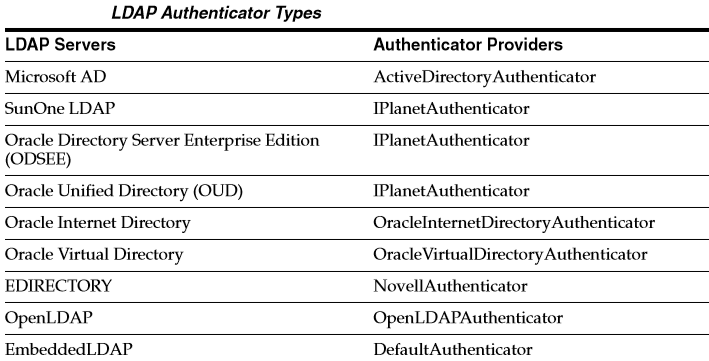
If you want to configure WebCenter Content to use an external LDAP server and have dynamic groups (as well as static groups) on your Directory whose privileges you want recognized by WebCenter Content, additional configuration is necessary.
User creation, authentication, and authorization is managed using Oracle Platform Services Security (OPSS), which uses a different mechanism to gather Directory Server information when compared to the native Oracle WebLogic Server providers for an external LDAP server.
 Sanae BEKKAR - My Blog -
Laisser un commentaire