A service resource is defined in an HTM file using a ResultSet table with the following three columns:
■ « Name » :defines the name for each service. For client-side service requests, this is the name called in :
http://cs.example.com/cs/idcplg? IdcService=GET_DOC_PAGE&Action=GetTemplatePage&Page=HOME_PAGE
■ http://cs.example.com/ is the web address of the Content Server instance.
■ cs/idcplg is the path to the Web server filter.
■ IdcService=GET_DOC_PAGE tells the Content Server to execute the GET_DOC_ PAGE service.
■ Action=GetTemplatePage tells the Content Server to return the results using a specified template page. This parameter is specific to the GET_DOC_PAGE service example.
■ Page=HOME_PAGE tells the Content Server which template page to use. This parameter is specific to the GET_DOC_PAGE service example.
■ The question mark (?) indicates the end of the Web server path and the beginning of Content Server parameters. ■ Ampersands (&) are used as separators between Content Server parameters.
■ You can include certain Idoc Script variables in a URL to affect page display at the time of the page request.
For standard web requests, this is almost always the URL to the Content Server web page.
■ « Attributes » :The Attributes column in the StandardServices table defines aspects of each service ,
* « Service Class » : attribute specifies the Java class object that the service can access. The classpath prefix intradoc.service is assumed unless a full path is given. The service class determines, in part, what actions can be performed by the service. The possible service classes are: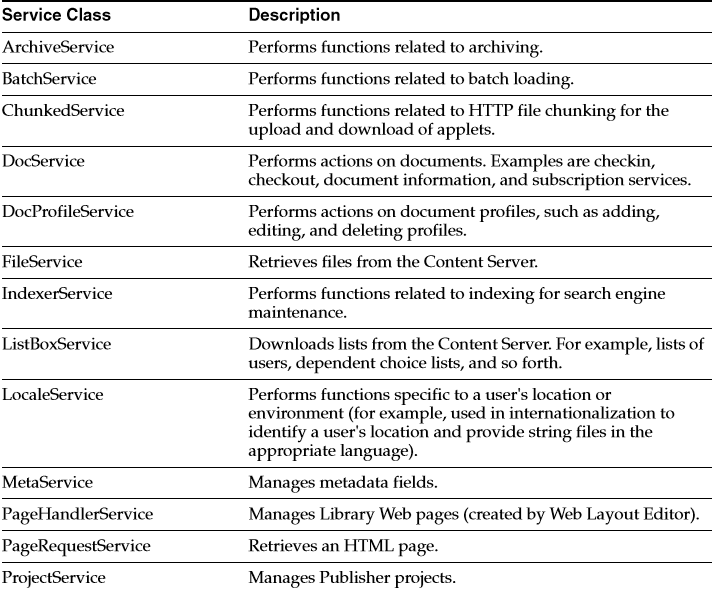
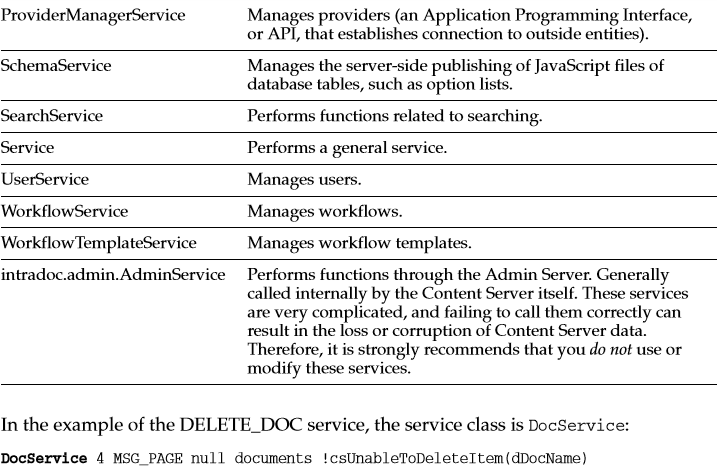

* « Access Level » model is similar to the document security model used throughout the Content Server.
The access level attribute assigns permission levels to the service. Any user attempting to execute the service must have at least this permission. Security access is stored as bit flags.
Generally only one privilege out of READ, WRITE, DELETE, or ADMIN is assigned to a service. The access level number is the sum of the following possible bit flags: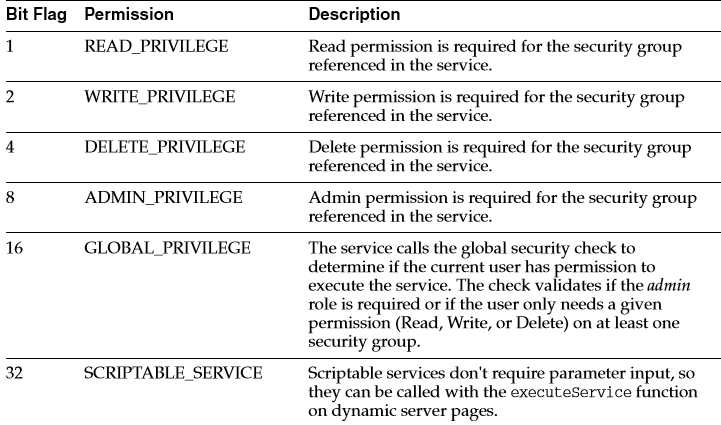 For example, to subscribe to a document the user only needs READ permission for that document’s security group.
However, to check in a new document the user would also need WRITE permission for that document’s security group.
If the service does not act on a specific document (such as GET_USER_INFO, CHECKIN_NEW_FORM, and so forth), the GLOBAL_PRIVILEGE bit flag should be set along with at least one more permission bit flag.
The user must have that level of permission in at least one security group to execute the service.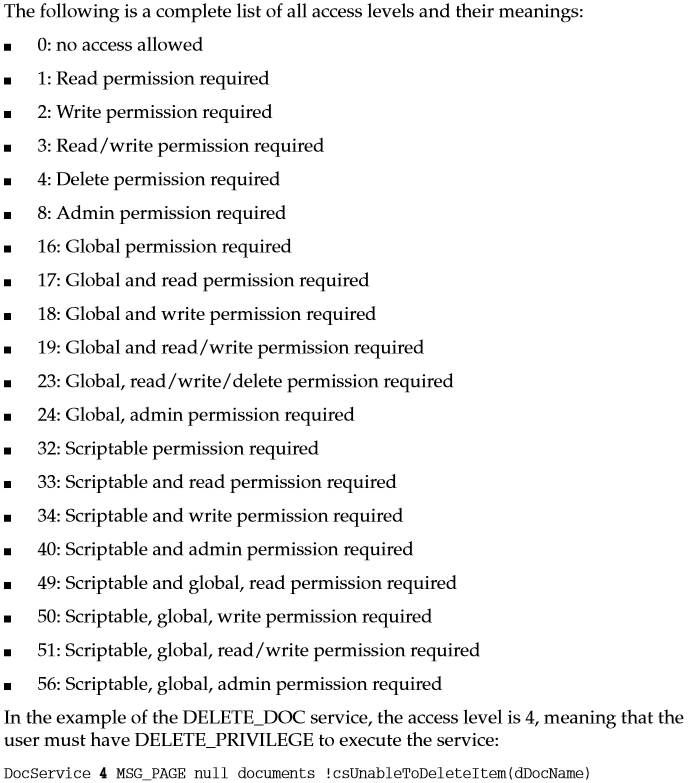
As another example, the access level for the ADD_ALIAS service is 24, meaning that the user must have ADMIN_PRIVILEGE and GLOBAL_PRIVILEGE to execute the service:
ADD_ALIAS UserService 24 null null aliases !csUnableToAddAlias.
* « Template Page » attribute specifies the template that displays the results of the service.
If the results of the service do not require presentation (such as the PageHandlerService type), this attribute is null.
Templates are a combination of HTML and Idoc Script. The Idoc Script is used to format the HTML and display the data in the response.
The template page name is mapped to an HTM file in the IdcHomeDir/components/Folders/resources/templates/templates.hda file:
■ Most template pages are mapped in the IntradocTemplates ResultSet.
■ Search template pages are mapped in the SearchResultTemplates ResultSet.
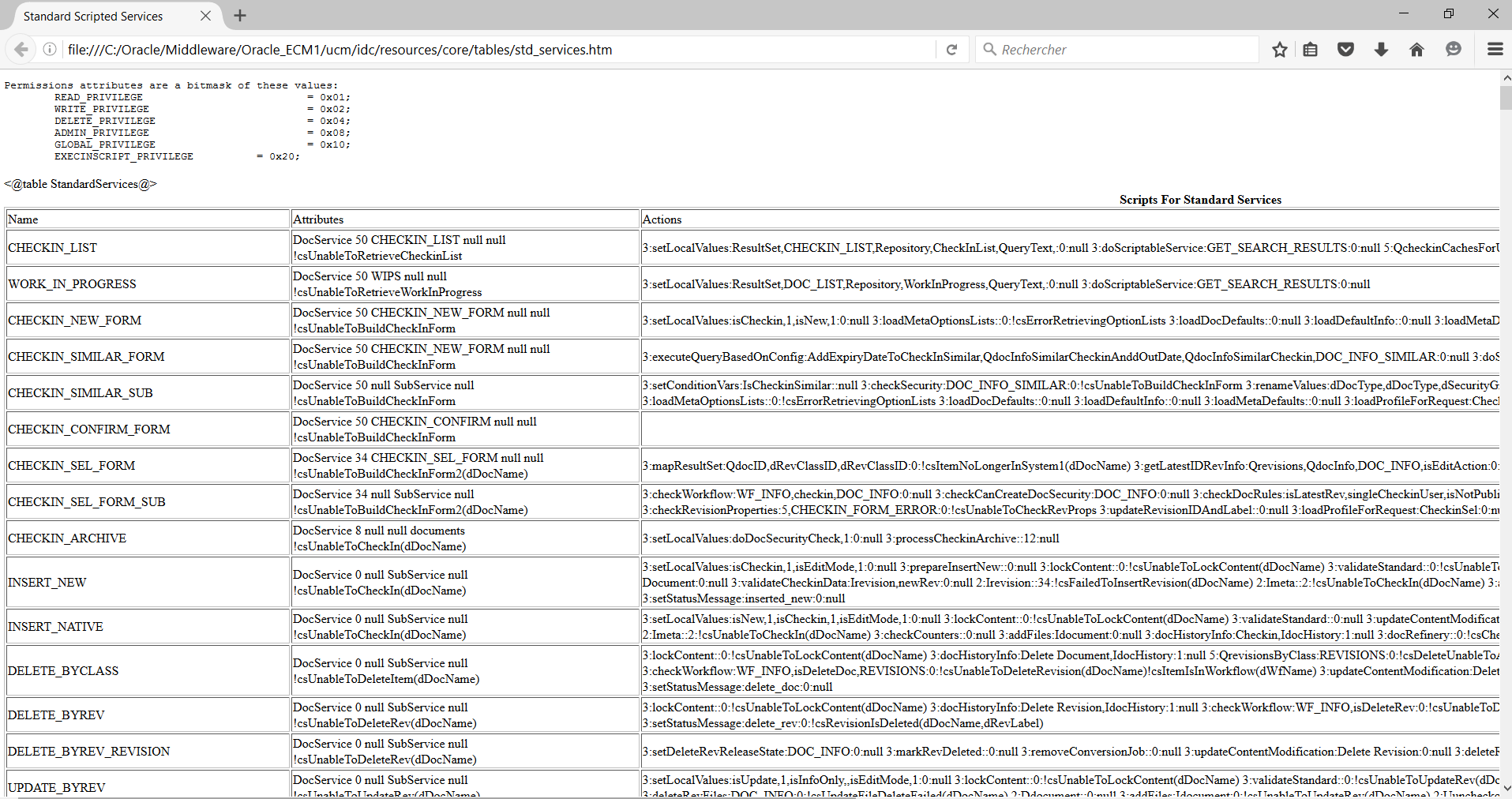
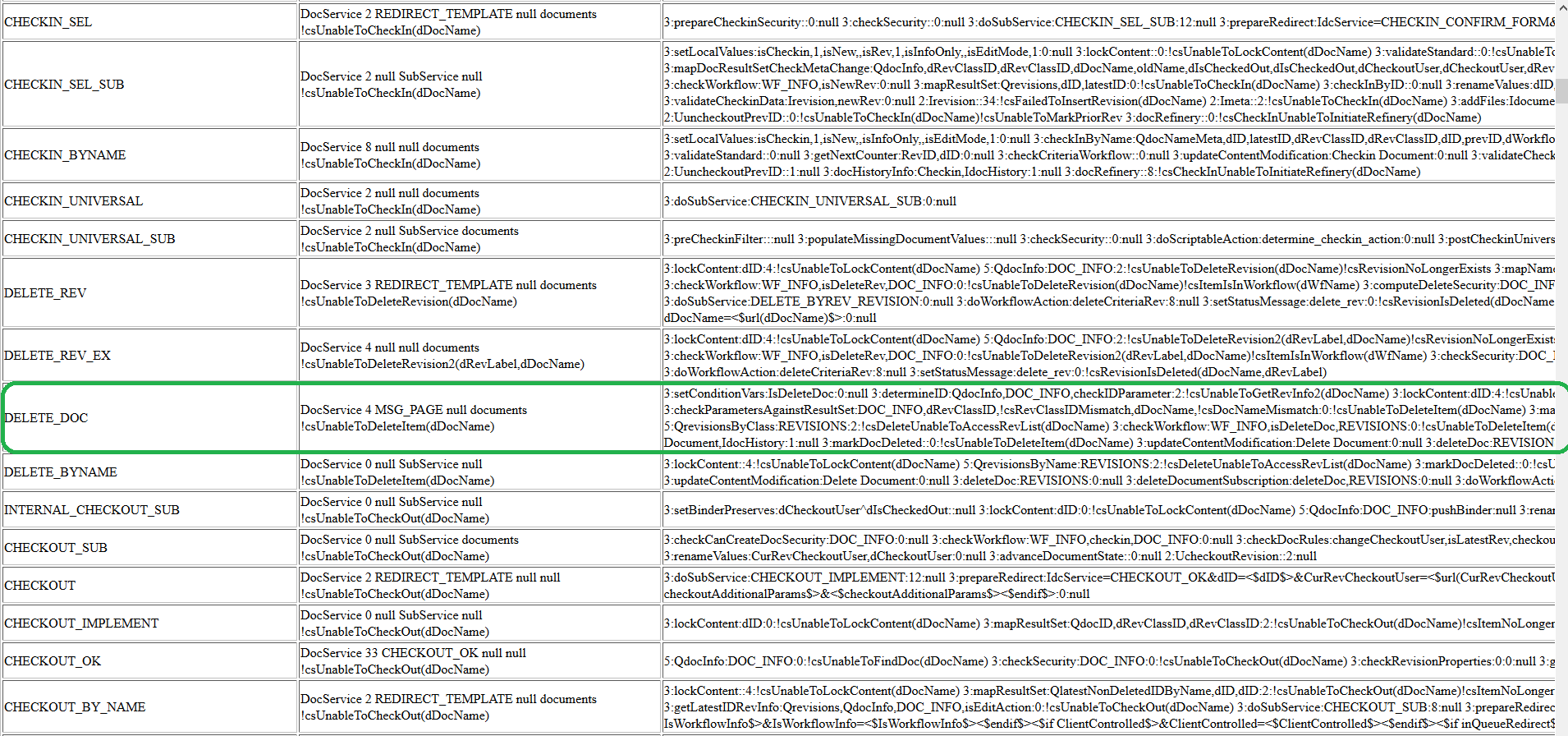
the DELETE_DOC service, the template page that presents the results of the service is MSG_PAGE, which is mapped to the msg_page.htm file
* « Service Type » attribute specifies if the service is to be executed as a SubService inside another service. You cannot call a second service from a main service unless the second service is a SubService.
* « Subjects Notified » attribute specifies the subjects (subsystems) to be notified by the service.
If a service changes one or more subjects, it must notify the remote sources (such as database tables) that cached information has been updated.
For example, if you do an IsJava=1 call for any service, you will always see changedSubjects and refreshSubjects in the response.
These subjects are used to notify the client when the state of the Content Server instance has changed.
For example, they notify the client when a new user is added to the system, when a new document has been checked in, when custom metadata has been changed, and so on.
This allows external applications to refresh their data when the Content Server state changes.
For example, if you launch the Repository Manager and then check in a new document, you will (in a few seconds) see that item appear in the applet.
Possible subjects are: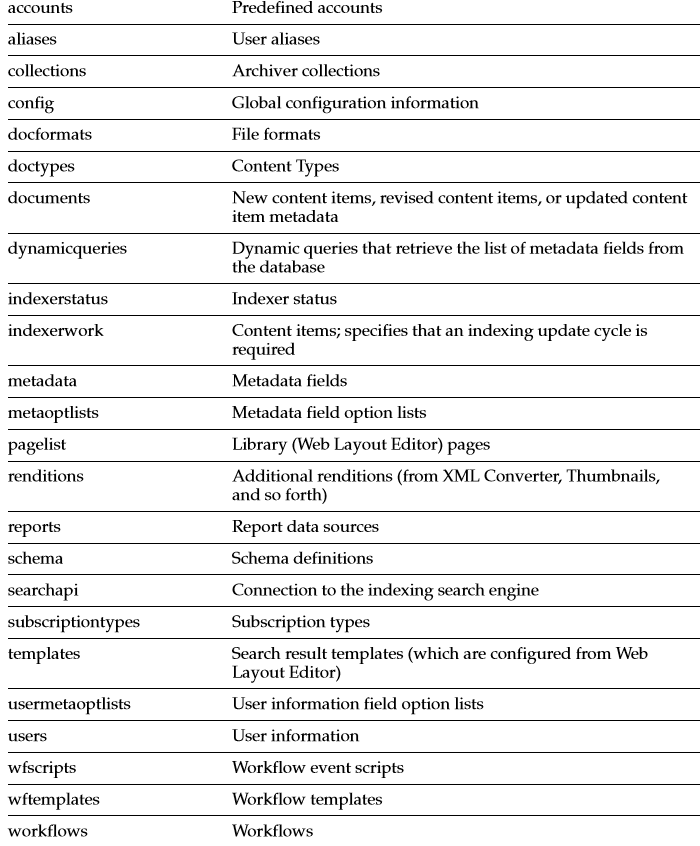 the DELETE_DOC service, the documents subject is the only subject notified
* »Error Message » error message attribute defines the error message that is returned by the service if no action error message overrides it. This can be either an actual text string or a reference to a locale-sensitive string.
the DELETE_DOC service, the error message is a localized string:
!csUnableToDeleteItem(dDocName)
The standard Content Server services are defined in the StandardServices table in the IdcHomeDir/resources/core/tables/std_services.htm file.
Services depend on other resource definitions to perform their functions.
– Any service that returns HTML requires a template to be specified. A common exception is the PING_SERVER service, which does not return a page to the browser.
– Most services use a query. A common exception is the SEARCH service, which sends a request directly to the search collection.
■ « Actions » column defines one or more steps taken to process the service. An action is an operation to be performed as part of a service script.
Actions can execute SQL statements, perform a query, run code, cache the results of a query, or load an option list.
The data returned by one action can alter the behavior of later actions. An action is defined as a list of colon-separated segments, using the following format:
action_type:action_name:action_parameters:control_mask:error_message
Action_Type :
The possible action types are: the DELETE_DOC service, the action is a Select cache query type (5):
Action Name : defines the name of the action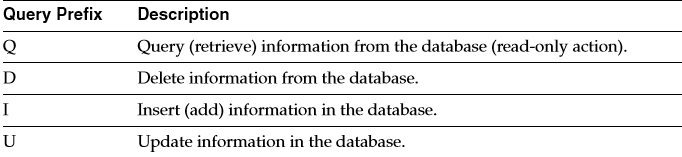
The DELETE_DOC service, the name of the action is QdocInfo. This specifies that a read-only query (Q) will be performed on the database.
Action Parameters : The third segment of an action statement specifies the parameters that the action requires.
If no parameters are required, this segment is left empty (two colons appear in place of the parameters).
■ If the action requires parameters, enter the parameters as a comma-delimited list.
■ For the Select cache query action type, the first parameter is the name that the action assigns to the ResultSet returned from the query. This ResultSet can then be referenced in the template page.
■ For the Load option list action type, the parameters are optional. However, if parameters are given, the first parameter is the key under which the option list is loaded, and the second parameter is the selected value for display on an HTML page.
the DELETE_DOC service, the ResultSet that is returned from the service query will be named DOC_INFO.
Action Control Mask : The fourth segment of an action statement is an optional bit flag that controls the results of queries to the Content Server database.
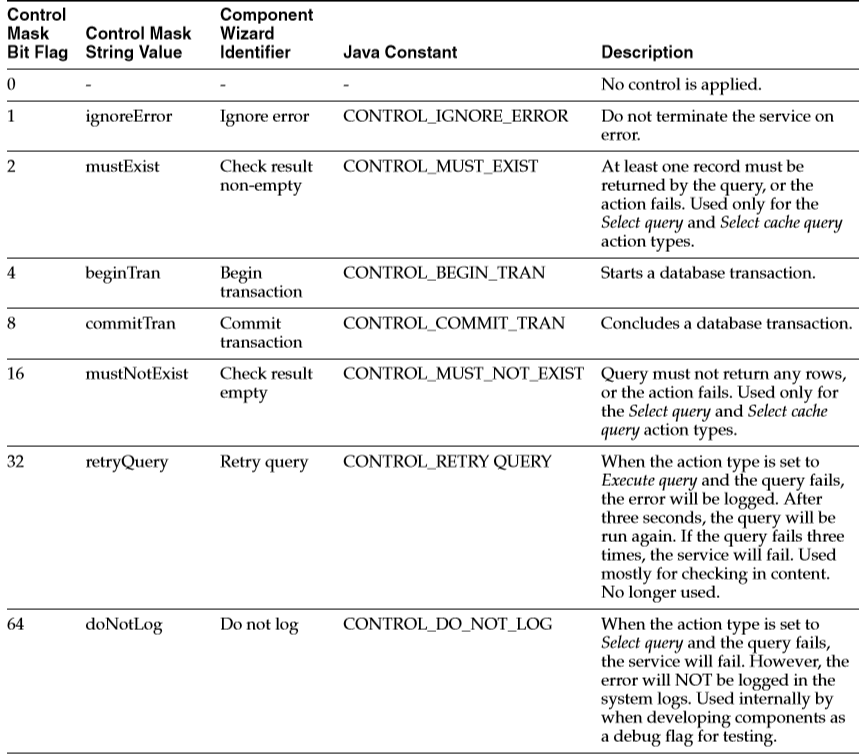 The DELETE_DOC service, the control mask value is 6, which means that at least one record must be returned by the query (2), and the action starts a database transaction (4):If this was a custom service created using the Component Wizard, the sum of the control mask bit flags would be replaced by a comma-delimited list of the bit flag string values:
5:QdocInfo:DOC_INFO:mustExist, beginTran:!csUnableToDeleteItem(dDocName) !csRevisionNoLongerExists
Error_Message :
The fifth segment of an action statement defines the error message to be displayed if this action fails. This can be either an actual text string or a reference to a locale-sensitive string.
■ An action error message overrides the error message provided as an attribute of the service.
■ If the error message for an action is not null, it becomes the error message for the remainder of the actions in the service.
■ If the error message for an action is null, the error message remains unchanged from the previous action.
■ String references are preceded by an exclamation point.
The DELETE_DOC service, the error message is a combination of two localized strings:
5:QdocInfo:DOC_INFO:6:!csUnableToDeleteItem(dDocName)!csRevisionNoLongerExists
See the next part of this post « Structure of Oracle WebCenter Content services – Part 2 »
 Sanae BEKKAR - My Blog -
Laisser un commentaire