File Store Provider Resource Tables
I – PartitionList Table
The PartitionList table defines the partitions that are available for the partitionSelection algorithm.
The table is defined in the fsconfig.hda file, located in the DomainHome/ucm/cs/data/filestore/config/ directory,
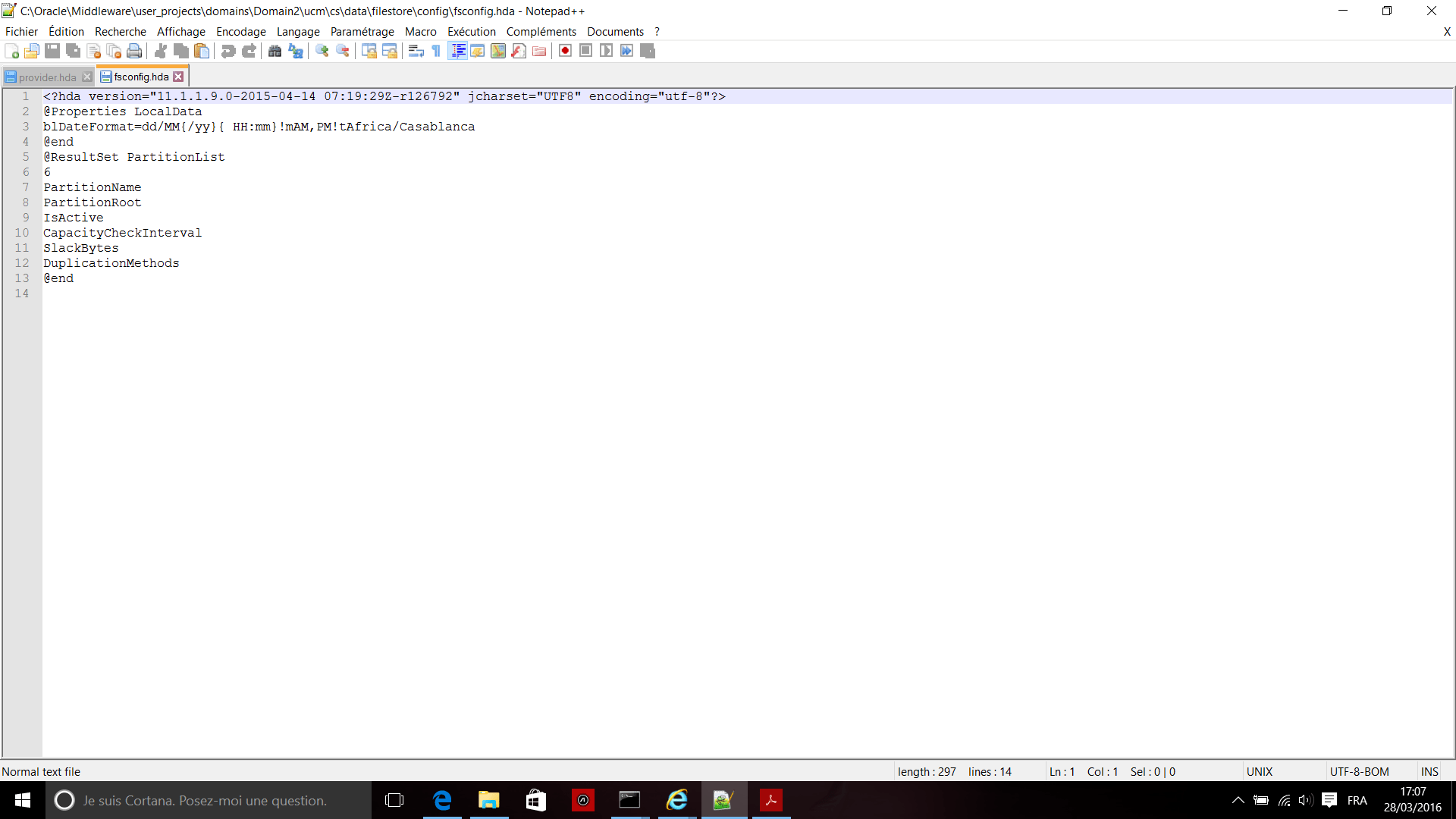
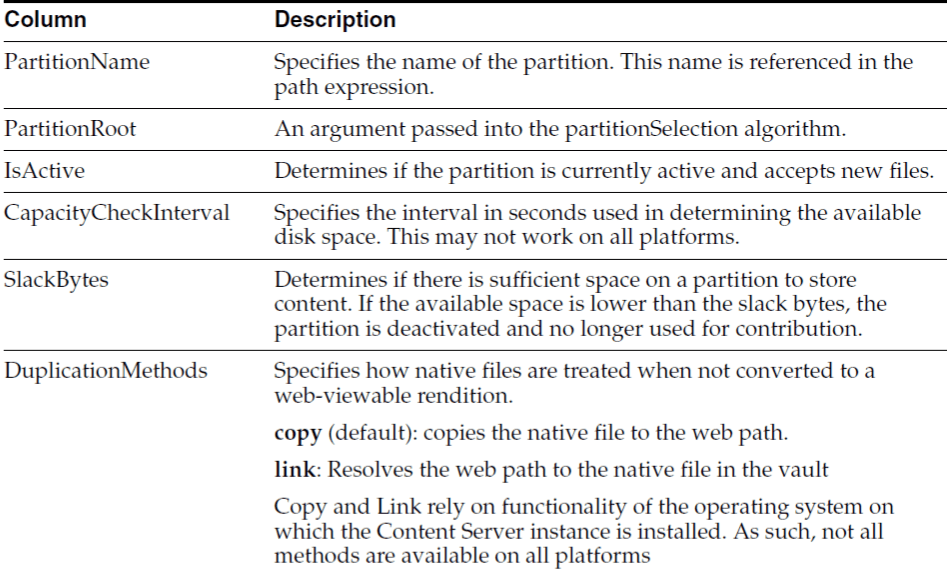
and modified using the Add/Edit Partition page in the Content Server interface.
II – Adding or Editing a Partition
You can create partitions to define additional root paths to files managed by Content Server but requiring storage in different locations or on different types of media.
You create partitions using the Partition Listing page.
When a new partition is created, Content Server modifies the PartitionList resource table in the fsconfig.hda file, located in the IntradocDir/data/filestore/config/ directory.
III – Folders
Folders, implemented with the FrameworkFolders component, provides a hierarchical
folder interface similar to a conventional file system for organizing and locating some
or all of the content in the repository.
In addition, a migration utility is available to move folders and folder content from the
earlier Folders_g component.
Do not use both Folders and Contribution Folders (supported by the Folders_g
component) unless content must be migrated from Contribution Folders to the Folders
interface. To migrate the folders and files from Contribution Folders to the Folders interface, use the Folders Migration utility to replicate the folder hierarchy and selectively migrate folder content.
IIII – Adding a Partition to the Weblayout Path
This example shows how to partition both vault and weblayout directories, and also maintain valid web URL file paths.
Add the partition root to the web-viewable path and web URL file path, and edit the variables $FsWeblayoutDir$ and $FsHttpWebRoot$ on the Storage Rule Name dialog.
$FsWeblayoutDir$ represents $PartitionRoot$/weblayout. $FsHttpWebRoot$ represents $HttpWebRoot$/$xPartitionId$/weblayout/.
Define partitionRoot in the Add/Edit Partition page as follows: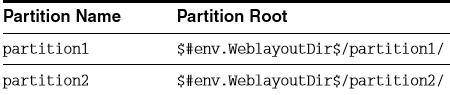 In order to keep the web URL file path consistent with the web-viewable path in the weblayout directory, the variable xPartitionId is used so that partition1 or partition2 is correctly replaced when creating the web URL file path.
Ensure that the web-viewable path and the web URL file path evaluate into the same path. ■ $FsWeblayoutDir$ represents $PartitionRoot$/weblayout/.
For partition1 this evaluates to $#env.WeblayoutDir$/partition1/weblayout/.
For partition2 this evaluates to $#env.WeblayoutDir$/partition2/weblayout/.
■ $FsHttpWebRoot$ represents $HttpWebRoot$/$xPartitionId$/weblayout/.
For partition1 this evaluates to $HttpWebRoot$/partition1/weblayout/.
For partition2 this evaluates to $HttpWebRoot$/partition2/weblayout/.
If you set up the partitions (partition1 and partition2) to use the partition root of $#env.VaultDir$/partition1 and $#env.VaultDir$/partition2 instead of the $#env.WeblayoutDir$ and $HttpWebRoot$ settings, then the weblayout file will end up stored in the vault directory.
It then can be used only for partitioning the vault files.
 Sanae BEKKAR - My Blog -
Laisser un commentaire