Oracle SOA Suite (for AXF and Imaging)
AXF for BPM and AXF for BPEL need Oracle SOA Suite installed, in the same domain as Oracle WebCenter Content or in a separate domain .
Imaging usually requires Oracle SOA Suite as well. You can install Oracle SOA Suite
on the same machine as the Oracle WebCenter Content applications or on a different machine.
If you are using Imaging with Oracle BPEL Process Manager and AXF for BPM or AXF for BPEL, preinstallation requirements include installing Oracle SOA Suite 11 g, Oracle JDeveloper, and Oracle Application Development Framework 11g.
On the Oracle Fusion Middleware Software Download page , download the following
software:
-SOA Suite (11.1.1.9.0) under Runtime Software
-JDeveloper and Application Development Framework (11.1.1.9.0)under
Required Additional Software
After JDeveloper is installed, you must install the Oracle SOA Suite Design-Time components.
Oracle SOA Suite is not automatically installed with JDeveloper. Before you can create a SOA application and project, you must install the Oracle SOA Suite Extension for JDeveloper.
Topology Summary for Oracle WebCenter Content
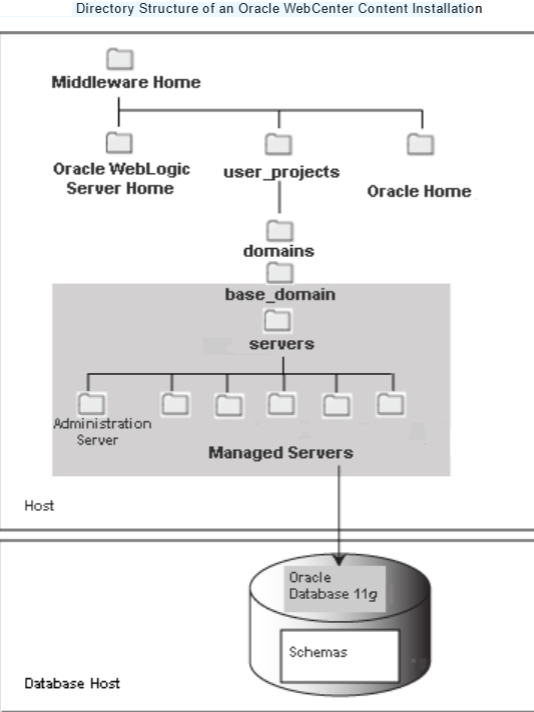
When you install Oracle WebLogic Server, the Oracle WebLogic Server Installer creates
a Middleware home directory (MW_HOME) that contains the Oracle WebLogic Server
home directory (WL_HOME) and an Oracle Common home directory (ORACLE_COMMON_
HOME), which contains the binary and library files required for Fusion Middleware
Control and Java Required Files (JRF).
When you install Oracle WebCenter Content, a WebCenter Content Oracle home directory (
WCC_ORACLE HOME) is created under the Middleware home directory. The WebCenter Content Oracle home directory contains the binary and library files for Oracle WebCenter Content.
When you configure Oracle WebCenter Content to create an Oracle WebLogic Server domain, a domain directory is created under the MW_HOME/user_projects/domains
directory. The directory for the domain where you configure Oracle WebCenter
Content contains the Administration Server and one or more Managed Servers, each hosting an Oracle WebCenter Content application.
Based on the application or applications that you install, the following Managed Servers are created:
-WebCenter Content Managed Server
-Inbound Refinery Managed Server
-Imaging Managed Server
-Oracle WebCenter Enterprise Capture Managed Server
-Oracle IRM Managed Server
– Records Managed Server.
The configuration wizard is in the following directory.
WCC_ORACLE_HOME represents the WebCenter Content Oracle home directory, where Oracle WebCenter Content is installed.
The WebCenter Content Oracle home was specified in the Oracle Home Directory field on the Specify Installation Location screen of the installer (default Oracle_ECM1).
-UNIX path:
WCC_ORACLE_HOME /common/bin
-Windows path:
WCC_ORACLE_HOME\common\bin
To create a log file of your configuration session, start Fusion Middleware Configuration Wizard with the -log option:
-UNIX script:
WCC_ORACLE_HOME/common/bin/config.sh -log=log_file_name
Your log file will be created in the location from which you start the configuration wizard.
-Windows script:
WCC_ORACLE_HOME\common\bin\config.cmd -log=log_file_name
Your log file will be created in your inventory_ location \logs\installActions\logs directory.
The default inventory_location value follows: %PROGRAMFILES%\Oracle\Inventory
You can specify the location of the Oracle WebCenter Content application in the
Application location field. The default location is MW_HOME/user_projects/applications/
For Oracle IRM, SSL is enabled by default, with port number 16101.
SSL needs to be configured so that Content application server Desktop does not show prompts to accept certificates when it contacts the Managed Server. The certificate used
must be trusted by Microsoft Internet Explorer on computers running Oracle IRMDesktop.
Oracle IRM should be deployed on a cluster or on a Managed Server that is not a member of any cluster because Oracle IRM uses persistent-store-type as replicated_if_clustered.
If the Oracle IRM web application is deployed on a clustered server, the in-effect persistent-store-type value will be replicated.
Otherwise,memory is the default.
When deploying Oracle IRM to a cluster, make sure that the Oracle IRM application is deployed to all nodes.
 Sanae BEKKAR - My Blog -
Laisser un commentaire