you will see how it offers a more convenient way to manage policies across endpoints of both standard J2EE applications as well as components of a composite.
While the commands to add or remove policies are quite descriptive, it is important to know the correct set of arguments required by them.
These and other such WLST commands for OWSM policy administration share a common set of input arguments. The following table discusses each of these arguments and a mechanism to derive them to make your job easier:
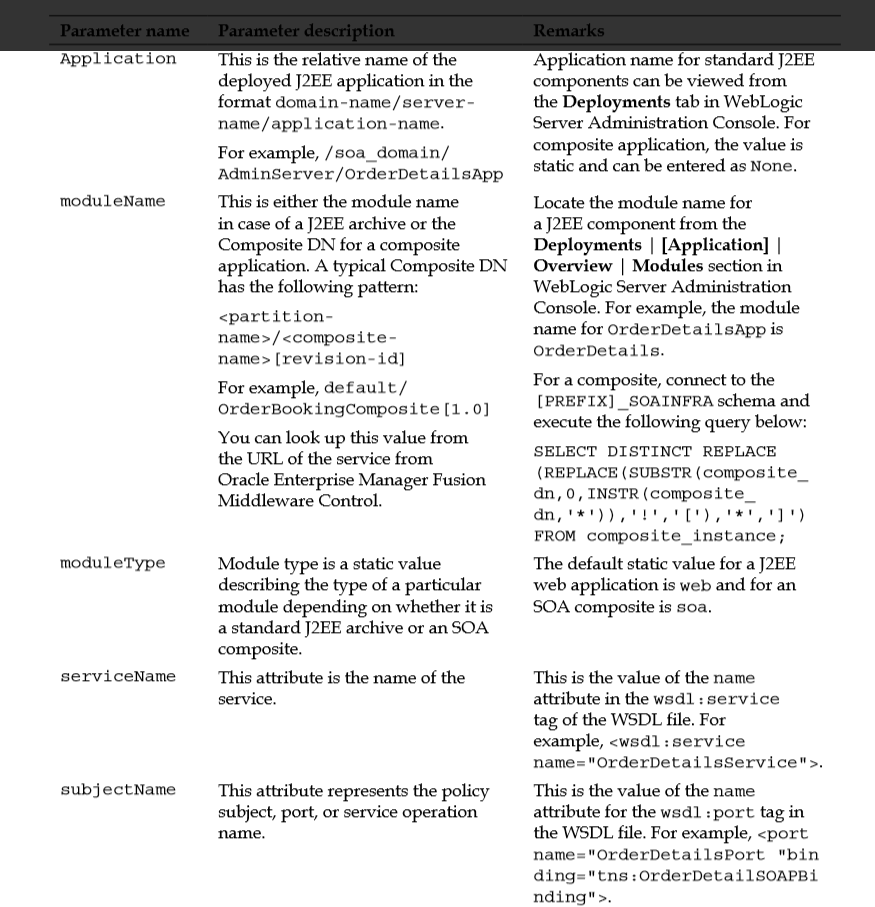
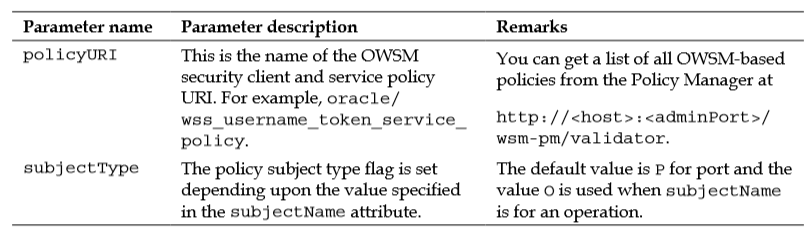
> Take an example where a remote service was protected, using a username/password token. It is consciously decided to immediately switch over to SAML-based authentication and the task is assigned to you. In this case and ones similar to it, you can accomplish the task by running a few WSLT-based scripts to attach and remove OWSM security policies.
Have a look at the signature of the command to add a particular policy to a service endpoint using WLST:
attachWebServicePolicy(application, moduleOrCompName, moduleType, serviceName, subjectName, policyURI, subjectType)
An example of this is shown here:
attachWebServicePolicy(‘/soa_domain/adminServer/OrderDetailsApp’, ‘OrderDetails’, ‘web’, ‘GetOrderLines’, ‘OrderDetailsPort’, ‘oracle/ss11_username_token_with_message_protection_service_policy’, ‘P’)
> This can be used to detach a security policy applied to the service:
detachWebServicePolicy(application, moduleOrCompName, moduleType, serviceName, subjectName, policyURI, [subjectType=None])
An example of this is shown here:
detachWebServicePolicy(‘None’, ‘default/OrderBookingComposite[1.0]’, ‘soa’, ‘OrderDetailsService’, ‘GetOrderLines’, ‘oracle/wss11_username_ token_with_message_protection_client_policy’)
Enabling/disabling a policy
Policies that are attached to an endpoint are either in an enabled or disabled state. Policy enforcement will take place only when the policy state is enabled.
This is useful as you are spared from attaching and detaching policies to endpoints every time there is a change in security requirements.
The syntax and a brief usage scenario for this command is as follows:
enableWebServicePolicy(application, moduleOrCompName, moduleType, serviceName, subjectName, policyURI, [enable], [subjectType=None]
Here, setting the enable property value to true enables the attached security policy and a Boolean value of false disables it.
An example of this is shown here:
enableWebServicePolicy(‘/soa_domain_dev/AdminServer/ EmpDeptService’, ’empDeptService’, ‘web’, ‘EmpDeptBCService’, ‘EmpDeptBCServiceSoapHttpPort’, ‘oracle/wss_saml_or_username_token_ service_policy’, false)
OWSM is the policy framework used by Oracle SOA Suite 11g to implement service level security. This chapter covered a huge amount of information surrounding the ability to secure your Oracle SOA Suite 11g services.
Not only that, but numerous topics including logging, exporting, importing, and versioning by using a combination of WLST and console approaches were introduced.
Web services security is a vast topic in itself, and this chapter focused on certain core concepts followed by explanations on how to administer, monitor, and promote these policies.
To understand how the OWSM framework works as well as cover various areas of administration surrounding it, this chapter covered the following points:
• An overview of the OWSM policy framework
• Policy interceptors, assertions, and templates
• Concepts surrounding the credentials and keystores, and how to configure them
• Managing OWSM policies at runtime, such as attaching/removing policies from services as well as enabling/disabling policies
• Other areas such as versioning, monitoring, logging, and migrating policies
 Sanae BEKKAR - My Blog -
Laisser un commentaire