The basic deployment unit for an SOA composite is a .sar (SOA Archive) file that could be part of an .ear (Enterprise Archive) file.
BPEL is a programming language, and activities provide functions and operations for creating a BPEL process web service. Understanding the purpose and usage of the activities are very important for creating a BPEL process to serve a business function.
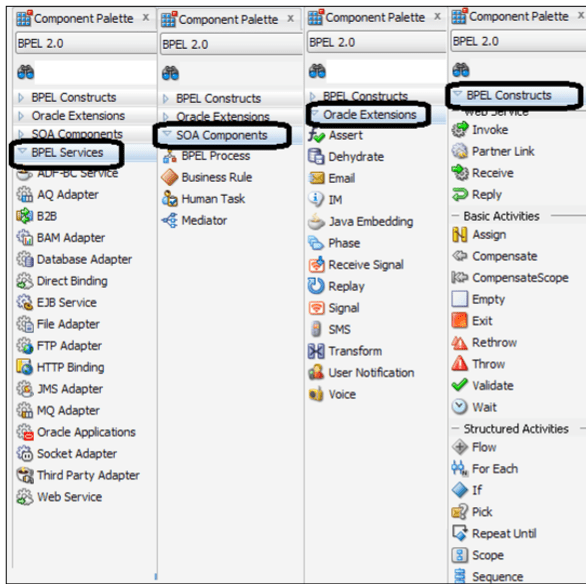
Basic activities The main steps of a BPEL process are performed by basic activities.
The basic activities communicate with web services (receive, invoke, reply),
change the content of variables (assign),
wait for a certain period (wait), or terminate the process (exit).
The following is a brief description of the basic activities:
• Receive: ° Part of the BPEL default template ° Waits for a client to make a request or processes asynchronous callback responses from external services
• Reply : ° Part of the BPEL default template ° Sends message as Reply after completing the processes
• Invoke ° A BPEL process uses Invoke to make service calls to partner web services ° Invokes partner web services either synchronously or asynchronously.
• Transform ° It is an XSLT Mapper and maps source elements to target elements ° Transform enables us to convert the document format usually from one XML schema to another XML schema or from an XML schema to another format such as Text, HTML, or PDF ° Helps working with complex data structures
• Assign ° Provide multiple copy operations such as append, insert after, and insert before ° Assists in copying and manipulating XML documents and elements.
• Wait ° Sleep for a certain amount of time or wait until a specified time has passed ° Usually used for waiting for a callback on asynchronous service response or recovering a failed service call after some time.
• Exit ° Assists us to end the process ° Usually Exit is used to kill/exit a running BPEL process, which is usually done when an exception occurs or data validation fails for an activity within the BPEL process. For example, an invalid order ID will make the BPEL terminate the activity and will not proceed with order fulfillment activities. The Exit activity replaces the Terminate activity from BPEL 1.1
• RepeatUntil ° Provides a mechanism to repeat the execution of a contained activity until a given Boolean condition becomes true. ° The minimum execution value is one.
• Compensate ° Assists us in implementing recovery business logic when it is either partially or fully executed ° Compensate activity through compensation handlers allows us to cancel or reverse a previously executed activity ° A compensation handler defines an undo sequence, for example, cancel order ° Compensate activity can be invoked either from another compensation handler or only from a fault handle
• Empty ° No action activity ° Usually used when you catch an exception and are taking no action.
Structured activities
BPEL provides activities for conditional branching based on data (If-Else), parallel execution (Flow), loop activities (While), way to group activities (Scope), executing activities in parallel (Flow), and selective event processing (Pick). Brief descriptions of the structured activities are listed as follows:
• Scope ° Assists in grouping activities ° Collection of nested activities with its own set of variables, partner links, exception handlers, message handlers, alarm handlers, and compensation handlers
• If ° Assists in branch-out processes within a BPEL process. ° Provides conditional branching such as between two or more branches using if, else if, and else constructs. The concept is the same as other programming languages’ switch statement. ° Replaces the switch activity of BPEL 1.1.
• While ° While is a looping construct ° Usually used while working with list, retry logic, or callback
• Flow ° Facilitates parallel execution or multi-threaded processing. ° Flow enables parallel execution of BPELs activities. ° For example, in a BPEL process, you need to perform two activities: getting the order name and location that can be processed in parallel for a better response time. We can create two BPEL branches and execute both in parallel using Flow.
• Pick ° Pick enables BPELs to implement event-based business logic that forces the process to wait until an event occurs. ° Pick enables BPELs to wait for message event(s) that are defined on onMessage or time condition alarm event(s) that are defined on onAlarm. ° Pick is very similar to onMessage in asynchronous JMS processing. The onMessage trigger will process the message once it arrives in either queue or topic.
• Sequence ° Single-threaded processing ° Enables executing a set of activities sequentially in a BPEL process
• forEach ° Replaces FlowN activity of BPEL 1.1. ° It is similar to a for loop in a programming language such as Java that enables the execution of multiple activities sequentially or in parallel.
Fault and error handling
Fault and error handling activity in BPEL allows us to implement the recovery from the runtime errors or business constraints. BPEL provides different fault-handling activities such as Catch, CatchAll, and Throw. Brief descriptions of the fault and error handling activities are listed as follows:
• Catch ° Catches an error condition ° Catch enables BPELs to catch an error or fault by its name. The catch activity gets executed only on failures
• CatchAll ° Catches unnamed error conditions ° CatchAll enables us to catch errors even by not specifying and/or knowing the name of the error.° It could be used if all the errors are handled the same way or in combination of Catch, if some errors needs special handling, and if a subset of them are handled the same way
• Throw ° Reports an internal fault ° Generates custom fault messages inside a business process
 Sanae BEKKAR - My Blog -
Laisser un commentaire