RESTful web service has much of the functionality of the del.icio.us web service and the del.icio.us web site.
Everything in the Resource-Oriented Architecture is also RESTful. But REST is not an architecture: it’s a set of design criteria. You can say that one architecture meets those criteria better than another, but there is no one “REST architecture.”
What’s a Resource? A resource is anything that’s important enough to be referenced as a thing in itself. If your users might “want to create a hypertext link to it, make or refute assertions about it, retrieve or cache a representation of it, include all or part of it by reference into another representation, annotate it, or perform other operations on it”, then you should make it a resource
What makes a resource a resource? It has to have at least one URI. The URI is the name and address of a resource. If a piece of information doesn’t have a URI, it’s not a resource and it’s not really on the Web, except as a bit of data describing some other resource.
All across the Web, there are only a few basic things you can do to a resource. HTTP provides four basic methods for the four most common operations: • Retrieve a representation of a resource: HTTP GET • Create a new resource: HTTP PUT to a new URI, or HTTP POST to an existing URI • Modify an existing resource: HTTP PUT to an existing URI • Delete an existing resource: HTTP DELETE
There are three other HTTP methods I consider part of the uniform interface. Two of them are simple utility methods, so I’ll cover them first. • Retrieve a metadata-only representation: HTTP HEAD , HEAD gives you exactly what a GET request would give you, but without the entity-body. Check which HTTP methods a particular resource supports: HTTP OPTIONS.
In a RESTful design, POST is commonly used to create subordinate resources: resources that exist in relation to some other “parent” resource. The POST method is a way of creating a new resource without the client having to know its exact URI. In most cases the client only needs to know the URI of a “parent” or “factory” resource.
The response to this sort of POST request usually has an HTTP status code of 201 (“Created”). Its Location header contains the URI of the newly created subordinate resource. Now that the resource actually exists and the client knows its URI, future requests can use the PUT method to modify that resource, GET to fetch a representation of it, and DELETE to delete it.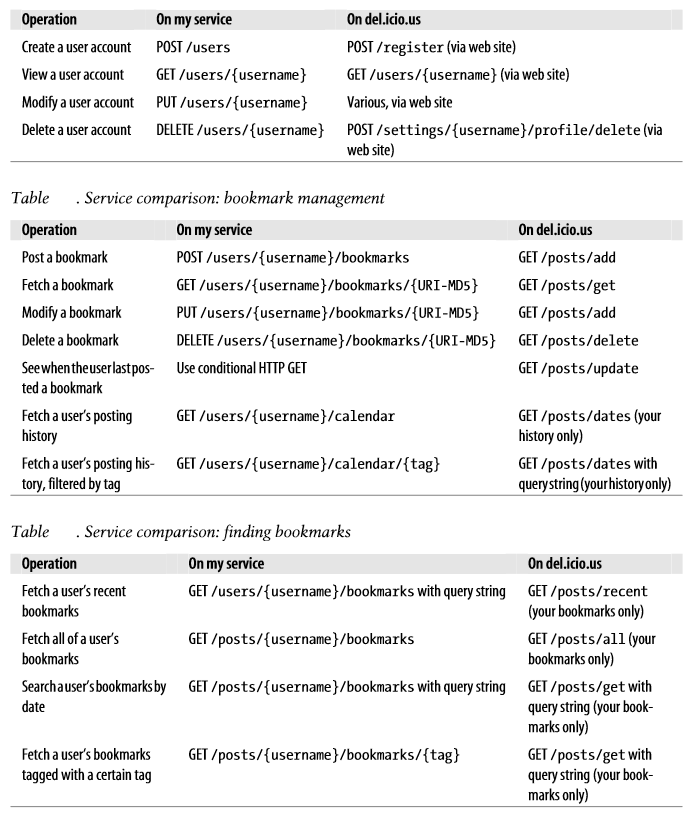
GET If the resource can be identified, send a representation along with a response code of 200 (“OK”). Be sure to support conditional GET!
PUT If the resource already exists, parse the representation and turn it into a series of changes to the state of this resource. If the changes would leave the resource in an incomplete or inconsistent state, send a response code of 400 (“Bad Request”). If the changes would cause the resource state to conflict with some other resource, send a response code of 409 (“Conflict”).
POST for creating a new resource Parse the representation, pick an appropriate URI, and create a new resource there. Send a response code of 201 (“Created”) and include the URI of the new resource in the Location header. If there’s not enough information provided to create the resource, send a response code of 400 (“Bad Request”). If the provided resource state would conflict with some existing resource, send a response code of 409 (“Conflict”), and include a Location header that points to the problematic resource.
POST for appending to a resource Parse the representation. If it doesn’t make sense, send a response code of 400 (“Bad Request”). Otherwise, modify the resource state so that it incorporates the information in the representation. Send a response code of 200 (“OK”).
DELETE Send a response code of 200 (“OK”).
 Sanae BEKKAR - My Blog -
Laisser un commentaire